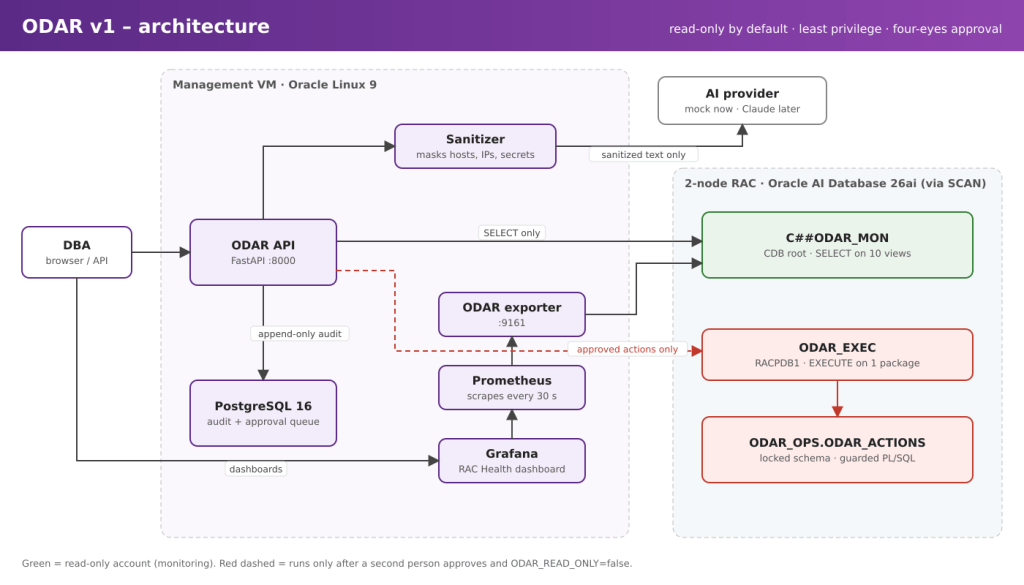
Building a DBA operations platform with FastAPI, PostgreSQL, Oracle RAC and approval-gated automation.
Alhamdulillah. This is the first post in a short series about ODAR (Oracle DBA Autonomous Operations & Resilience Platform), a project I built in my home lab on top of my two-node Oracle AI Database 26ai RAC.
ODAR watches the cluster and explains errors with the help of an AI model. The AI can only recommend actions. ODAR can also request a small set of predefined DBA tasks, but its workflow requires the action to be on an allowlist, the read-only switch to be off and a separate approval entry before anything runs against the database. In this lab version, requester and approver identities are not yet independently authenticated.
This post covers the design and the foundation: the management VM, the API, and an audit trail whose database records the application role cannot update or delete. The implementation is ahead of this series: monitoring, AI diagnostics and the approval workflow are already built and tested in my lab, and Parts 2 to 4 document each of them in turn.
| Part | Topic |
|---|---|
| 1 (this post) | Design, management VM, FastAPI skeleton, append-only audit trail |
| 2 | Read-only RAC monitoring with a least-privilege user, Prometheus and Grafana |
| 3 | AI-assisted diagnostics with a sanitizer and forced approval |
| 4 | Controlled automation: allowlist, requester/approver separation, kill switch, and the path to verified identities |
Why build this at all
Most of my working day is spent reading alerts, alert logs and AWR reports, and deciding what to do next. AI tools are getting good at the reading and explaining part. What worries me is the next step: a tool that also acts, on a production database, on its own judgement.
So I wanted to see what an AI-assisted operations tool looks like when it is built with the same rules we follow as DBAs: least privilege, change approval, and a record of everything.
The rules, before any code
I wrote these down first and checked every later decision against them:
- Read-only by default. A single setting blocks all execution.
- No SYSDBA for the application. The monitoring account gets SELECT on a short list of views and nothing else.
- No free-form SQL or shell. Only a small allowlist of actions exists.
- Separate requester and approver. Whoever requests an action cannot approve it. In this lab version the check compares the names entered; verified identities come with authentication in a later phase.
- AI recommends, never executes.
- Sanitize hostnames, IPs and secrets before anything goes to a cloud AI service.
- Record everything: who asked, who approved, what ran and what happened.
- Secrets stay out of Git.
Architecture
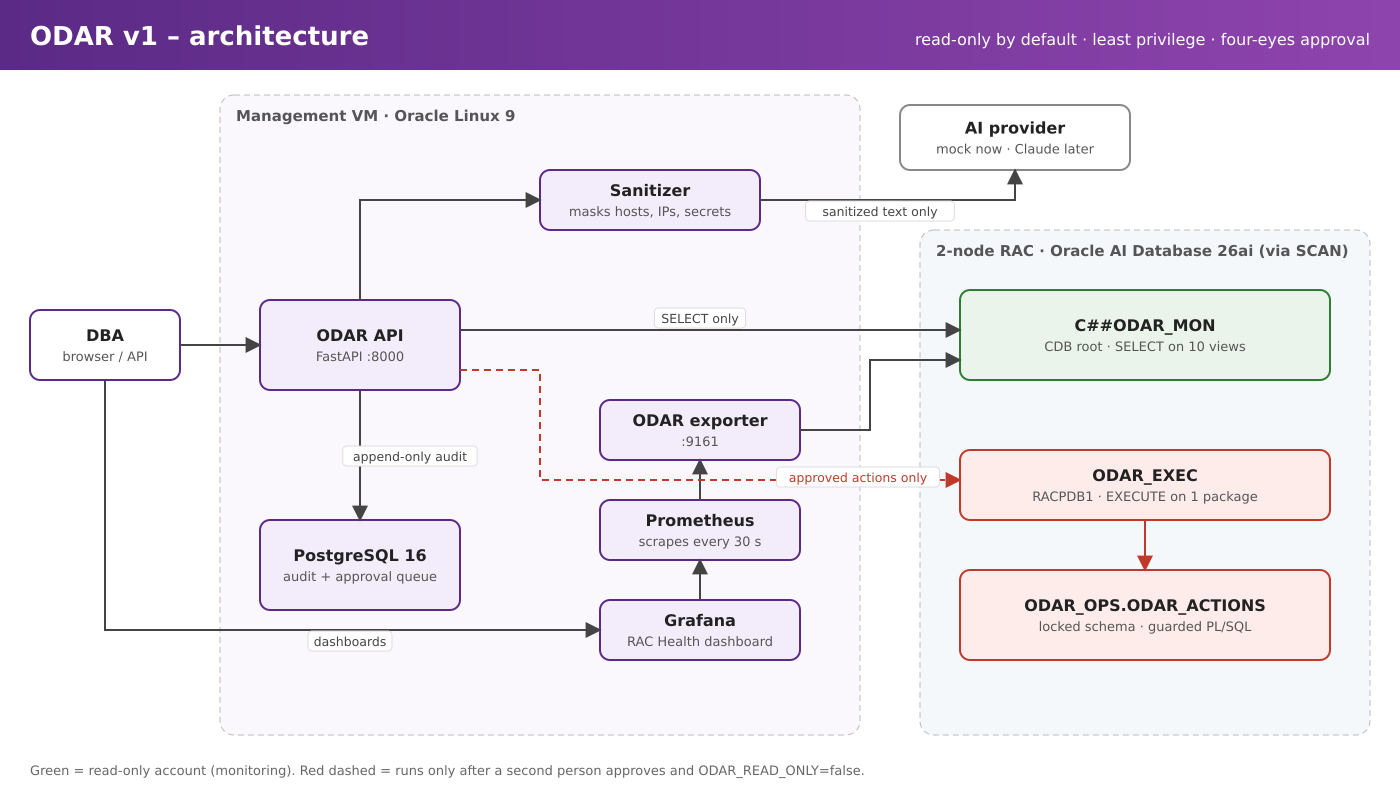
| Component | Role |
|---|---|
| ODAR API (FastAPI) | Single entry point for monitoring, diagnostics and action requests |
| PostgreSQL 16 | Audit trail and approval queue, local to the management VM |
| ODAR exporter + Prometheus + Grafana | Metrics and dashboards (Part 2) |
| Sanitizer + AI provider | Diagnostics; a mock provider for now (Part 3) |
Oracle monitoring account: C##ODAR_MON | Common user with SELECT on ten views, used for all monitoring |
Execution account: ODAR_EXEC → ODAR_OPS.ODAR_ACTIONS | Used only by the controlled-action workflow, after a separate approval entry is submitted and only when read-only mode is off. It can run one guarded PL/SQL package and nothing else (Part 4) |
The RAC itself was not changed. ODAR connects through SCAN like any other client, using python-oracledb in Thin mode, so no Oracle Client is installed on the management VM.
The lab
| VM | vCPU | RAM | Role |
|---|---|---|---|
| rac1, rac2 | 4 each | 16 GB each | Two-node RAC, Oracle AI Database 26ai (23.26.1) |
| dns1 | 1 | 1 GB | BIND for node, VIP and SCAN names |
| ODAR management VM | 4 | 8 GB | Oracle Linux 9, everything ODAR runs here |
That is 41 GB of the host’s 64 GB with all four running, which leaves enough for Windows. I kept the other lab VMs powered off while the RAC was up.
Building the management VM
An unattended install, after the GUI fought back
I created the VM with VBoxManage (4 vCPU, 8 GB, 100 GB disk, NAT plus host-only adapter). The graphical installer then gave me a window that was too small to show the Continue button, plus a mouse that kept getting captured. Instead of fighting it, I used VirtualBox’s unattended install:
# PowerShell, on the Windows host& $VBM unattended install "ODAR-MGMT01" ` --iso="<path>\OracleLinux-R9-U8-x86_64-dvd.iso" ` --user=odaradm --user-password="<password>" --admin-password="<password>" ` --full-user-name="ODAR Admin" --hostname=odar-mgmt01.lab.local ` --locale=en_US --country=IN --time-zone=Asia/Kolkata ` --package-selection-adjustment=minimal --start-vm=gui
Two things I learned on the way:
- Pass
--admin-passwordexplicitly. On my first attempt I passed only--password, the output showedadmin-password =empty, and I could not log in as root afterwards. I recovered by logging in as the admin user and resetting the root password with sudo. - Set the VM’s pointing device to a USB tablet before the first boot (
VBoxManage modifyvm <vm> --mouse usbtablet --usb-ohci on). It removes most of the mouse-capture trouble.
Static IP on the host-only network
The host-only adapter came up through DHCP first, and it was handed an address that one of my other (powered-off) lab VMs uses as a static IP. Nothing broke because that VM was off, but it is a good reminder: if you use static IPs inside a DHCP range, either shrink the range or check before you assign. I moved the VM to a fixed address outside the DHCP range and checked for duplicates first:
# Bash, as root on the management VMnmcli connection modify enp0s8 ipv4.method manual ipv4.addresses <mgmt-ip>/24 \ ipv4.gateway "" ipv4.never-default yes ipv6.method disabled connection.autoconnect yesnmcli connection up enp0s8# iputils arping, duplicate address detection: exit 0 = no reply received = no conflictarping -D -I enp0s8 -c 3 <mgmt-ip>; echo "dup-check exit=$?"
Leaving the gateway empty on the host-only adapter keeps the default route on the NAT adapter, so the VM can still reach the Oracle Linux yum server.
A sshd drop-in that did not take effect
While setting up the VM I could not use the console comfortably, so as a temporary lab workaround I allowed root SSH login with a password by adding PermitRootLogin yes in /etc/ssh/sshd_config.d/01-root.conf. It had no effect. sshd -T showed why:
# Bash, as root on the management VMsshd -T | grep -i permitrootloginpermitrootlogin without-password
sshd uses the first value it reads for this keyword, and the drop-in files are read in name order. Another file earlier in that order already set it. Renaming mine to 00-root.conf fixed it.
To be clear, this was a troubleshooting shortcut, not part of ODAR’s design, and I have since reverted it. I first confirmed that a non-root admin user could log in and use sudo, then removed the drop-in and restarted sshd. sshd -T now reports permitrootlogin without-password (the older spelling of prohibit-password), and a root login with a password is refused. For anything beyond a lab, I would use key-based SSH authentication with PermitRootLogin prohibit-password or no.
Base software and layout
# Bash, as root on the management VMdnf -y updatednf -y install git jq python3.12 python3.12-pip python3.12-devel gccuseradd -r -m -d /opt/odar -s /bin/bash -c "ODAR service account" odarinstall -d -o odar -g odar -m 750 /opt/odar /var/lib/odar /var/log/odarinstall -d -o root -g odar -m 750 /etc/odarsudo -u odar python3.12 -m venv /opt/odar/venv
| Path | Owner | Purpose |
|---|---|---|
/opt/odar/app | odar | Application code (Git repository) |
/etc/odar/odar.env | root:odar, 640 | Settings and credentials, never in Git |
/var/log/odar | odar | JSON application log and audit log |
/var/lib/odar | odar | Application data |
The update moved the VM from Oracle Linux 9.8 to 9.9, so a reboot followed before anything else.
The API skeleton
ODAR is a small FastAPI application. All settings come from /etc/odar/odar.env, read with pydantic-settings, so nothing sensitive sits in the code:
# Python: odar/config.py (excerpt, not the full module)class Settings(BaseSettings): model_config = SettingsConfigDict( env_file="/etc/odar/odar.env", env_prefix="ODAR_", extra="ignore") env: str = "lab" read_only: bool = True db_dsn: Optional[str] = None
The first endpoint was /health. It reports the version, the read-only flag and whether the audit database is reachable:

It runs under systemd as the odar user, with a few hardening options that cost nothing:
# systemd: /etc/systemd/system/odar-api.service (excerpt)[Service]User=odarGroup=odarWorkingDirectory=/opt/odar/appExecStart=/opt/odar/venv/bin/uvicorn odar.main:app --host 0.0.0.0 --port 8000Restart=on-failureNoNewPrivileges=yesPrivateTmp=yesProtectSystem=fullProtectHome=yesReadWritePaths=/var/log/odar /var/lib/odar
Uvicorn listens on all interfaces (0.0.0.0), so firewalld controls network access. The active public zone has rich rules that allow TCP ports 8000 (API), 3000 (Grafana) and 9090 (Prometheus) only from the host-only lab subnet (192.168.56.0/24). Both the NAT and host-only interfaces belong to this zone, so the restriction is by source address, not by interface. SSH is also allowed in the zone. The exporter port and PostgreSQL are not opened. The API has no authentication yet, including its /docs page, so this remains a restricted home-lab implementation. Authentication and HTTPS are planned for a later phase.
No authentication also means no verified identity. The requester and approver names are supplied by the client. The application checks that the two names differ and records both in the audit trail, but ODAR cannot yet prove who actually entered either name. So today this is an application-level separation check, not independently verified four-eyes approval. Authentication with verified user identities is the next hardening item, and until it is in place this remains a lab implementation, not suitable for production.
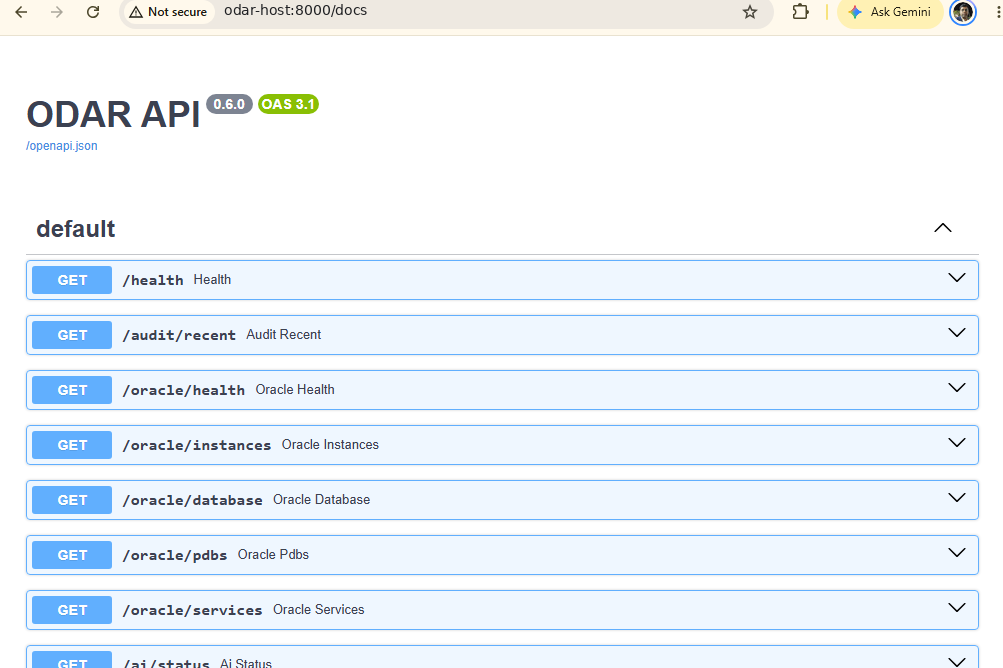
FastAPI also generates an interactive API page at /docs, which turned out to be the easiest way to demonstrate each feature:
An append-only audit trail for the application
Every action writes an audit record twice: a JSON line to /var/log/odar/audit.log, and a row in PostgreSQL. If the database is unavailable, the file still gets the record. The file is owned by the odar service account, so treat it as a convenience copy; the PostgreSQL table is the record the application cannot change.
The PostgreSQL table is owned by postgres. The application role gets INSERT and SELECT only, with no UPDATE, DELETE or TRUNCATE privilege:
-- PostgreSQL, as the postgres superuserCREATE TABLE audit_log ( audit_id uuid PRIMARY KEY, ts timestamptz NOT NULL DEFAULT now(), action text NOT NULL, operator text NOT NULL, target text NOT NULL DEFAULT '-', result text NOT NULL, details jsonb NOT NULL DEFAULT '{}'::jsonb);GRANT SELECT, INSERT ON audit_log TO odar_app;
Testing it with the application’s own credentials:
# Bash, as the odar service user$ psql "$ODAR_DB_DSN" -c "DELETE FROM audit_log;"ERROR: permission denied for table audit_log
That error is the point. A bug, or a future feature that goes wrong, cannot quietly remove the history through the application. PostgreSQL listens on localhost only, and the application’s password lives in the env file.
This is append-only for the application role, not tamper-proof. A PostgreSQL superuser or an operating-system administrator on the VM can still change or delete rows. For a stronger guarantee in a real environment, ship the audit records to a separate system that the DBA team does not administer.
Source control and a smoke test
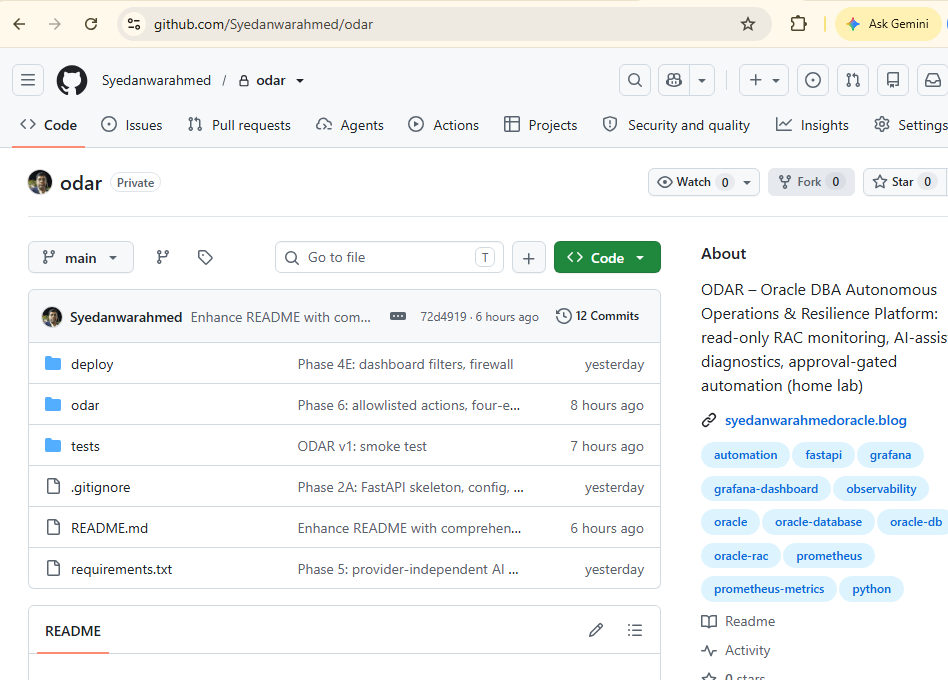
Each phase went into Git as its own commit, and the code is on GitHub: github.com/Syedanwarahmed/odar. Before the first push I ran a scan for passwords and keys; the only hits were field names and the .gitignore rule that keeps secrets out. Credentials live only in /etc/odar/odar.env on the VM.
I also keep a one-command smoke test that checks every layer:
# Bash, on the management VM$ /opt/odar/app/tests/smoke.shPASS /health ok + read_onlyPASS /audit/recent rowsPASS /oracle/health OKPASS /oracle/instances 2 OPENPASS /oracle/database READ WRITEPASS /oracle/pdbs RACPDB1 RW x2PASS /oracle/services PDB svcPASS /ai/status readyPASS /actions/catalog 4 actionsPASS /actions/requests queuePASS exporter oracle_up=1PASS prometheus targets upPASS grafana healthy----ALL PASS
Every check in that output ran against the current build in my lab. Most of them cover features that are already built and running but are explained in Parts 2 to 4 (monitoring, AI diagnostics and controlled actions). The AI layer currently uses a mock provider, which Part 3 explains. I run this test after every change and every lab restart.
Lessons from part 1
- Write the safety rules before the code. Several later shortcuts were easy to refuse because the rule was already on paper.
- Lab automation saves time when the GUI does not cooperate. The unattended install took one command and about fifteen minutes.
- When a setting does not take effect, ask the service what it actually loaded (
sshd -T) instead of rereading your own file. - Keep static IPs out of DHCP ranges, or check for duplicates before assigning one.
- Restricting the application role to INSERT and SELECT on the audit table is a single GRANT. There is no reason to skip it.
Next: monitoring the RAC with a read-only user
Part 2 connects ODAR to the cluster through SCAN with a common user that has SELECT on ten views and nothing else, and builds this dashboard with Prometheus and Grafana:
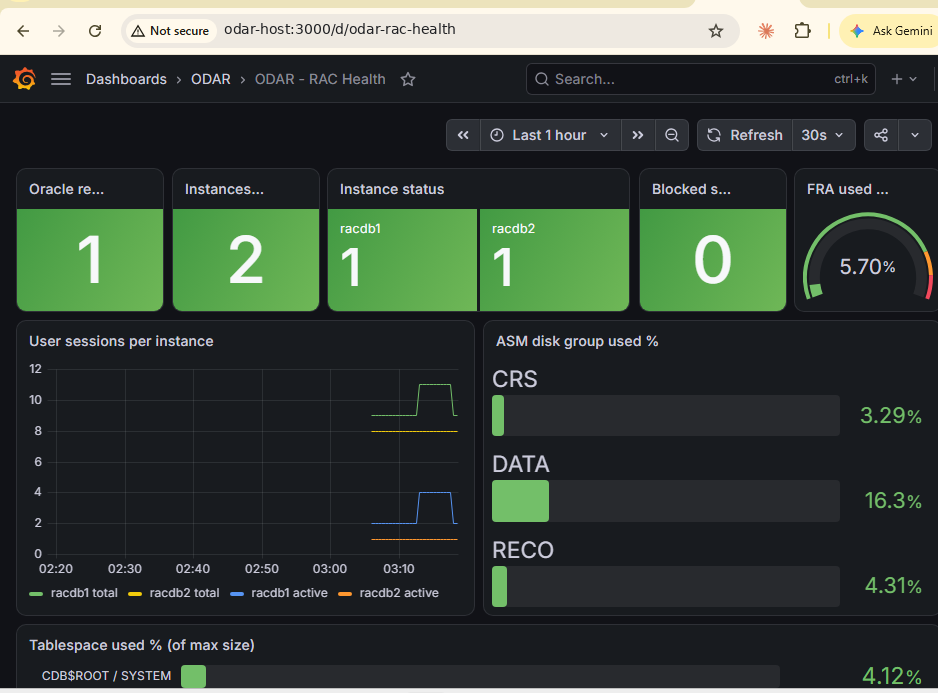
ما شاء الله, seeing both instances, the PDBs, ASM and FRA on one page, read by an account that cannot change a single row, was the moment this project started to feel real.
Disclaimer: this is a personal home-lab project, not an Oracle product. Test anything described here in a non-production environment first. Hostnames and IP addresses in this post are lab values or placeholders.
