Alhamdulillah.
Oracle has published its roadmap for the Oracle E-Business Suite 12.2 Next Generation Technology Stack. Oracle states that it plans to move the EBS 12.2 application tier to Fusion Middleware 14c, WebLogic Server 14c, Forms and Reports 14c, Oracle HTTP Server 14c and Java 17, and that the update is designed to use EBS 12.2 Online Patching rather than an applications upgrade. Today’s certified EBS 12.2 application tier still runs WebLogic Server 10.3.6 on JDK 7.
Before that update reaches the environments I support, I wanted hands-on time with WebLogic 14c itself. So I built a small standalone lab: a WebLogic 12.2.1.4 domain on JDK 8 with a test application, upgraded in place to WebLogic 14.1.2 on JDK 21 using the Reconfiguration Wizard.
Important scope note: this is a standalone WebLogic upgrade in a home lab. It is not the EBS Next Generation Technology Stack update and it is not an Oracle-supported EBS upgrade procedure. Oracle’s EBS process uses its own tooling (a manifest, a migration patch and the Technology Stack Update Assistant) and starts from WebLogic 10.3.6, not 12.2.1.4. What this lab shows is how WebLogic 14.1.2 behaves after an upgrade, which is useful background for that work.
Lab environment
| Item | Value |
| Host | VirtualBox VM, Oracle Linux 8.10 (UEK), 2 vCPU, 6 GB RAM (referred to as wlshost below) |
| Source | WebLogic Server 12.2.1.4.0 (GA, unpatched) on JDK 1.8.0_513 |
| Target | WebLogic Server 14.1.2.0.0 on JDK 21.0.8 |
| Domain | lab_domain, production mode, AdminServer on 7001, managed server ms1 on 8001 |
| Test app | labapp.war: one JSP printing the WebLogic version, Java version and server name |
| Method | New Oracle Home for 14.1.2, then reconfig.sh against the existing domain |
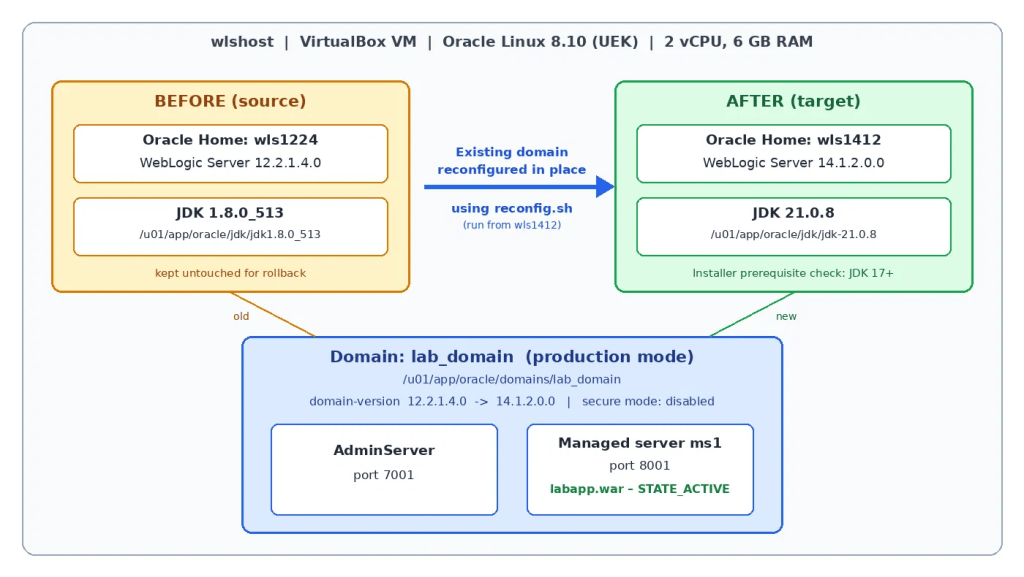
Step 1: The 12.2.1.4 baseline
WebLogic 12.2.1.4 was installed silently into /u01/app/oracle/middleware/wls1224 using JDK 8. The domain was created with offline WLST from the basic wls.jar template:
readTemplate('/u01/app/oracle/middleware/wls1224/wlserver/common/templates/wls/wls.jar')cd('/Security/base_domain/User/weblogic')cmo.setPassword('********')cd('/Server/AdminServer')set('ListenAddress','')set('ListenPort',7001)cd('/')create('ms1','Server')cd('/Server/ms1')set('ListenAddress','')set('ListenPort',8001)setOption('OverwriteDomain','true')setOption('ServerStartMode','prod')setOption('JavaHome','/u01/app/oracle/jdk/jdk1.8.0_513')writeDomain('/u01/app/oracle/domains/lab_domain')closeTemplate()exit()
The test application is deliberately simple. It uses a web.xml in the Java EE (javax) namespace and one JSP:
<%@ page import="weblogic.version" %><html><body><h2>Lab App - WebLogic Upgrade Test</h2><p>WebLogic: <%= weblogic.version.getVersions() %></p><p>Java: <%= System.getProperty("java.version") %> (<%= System.getProperty("java.vendor") %>)</p><p>Server: <%= System.getProperty("weblogic.Name") %></p><p>Time: <%= new java.util.Date() %></p></body></html>
It was deployed to ms1 with weblogic.Deployer and verified in the browser:
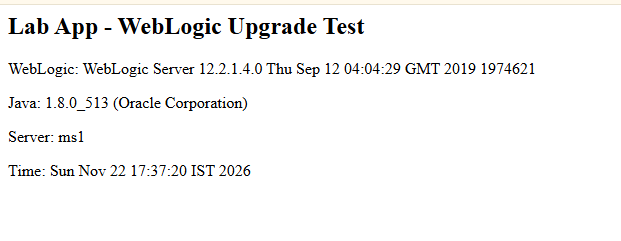
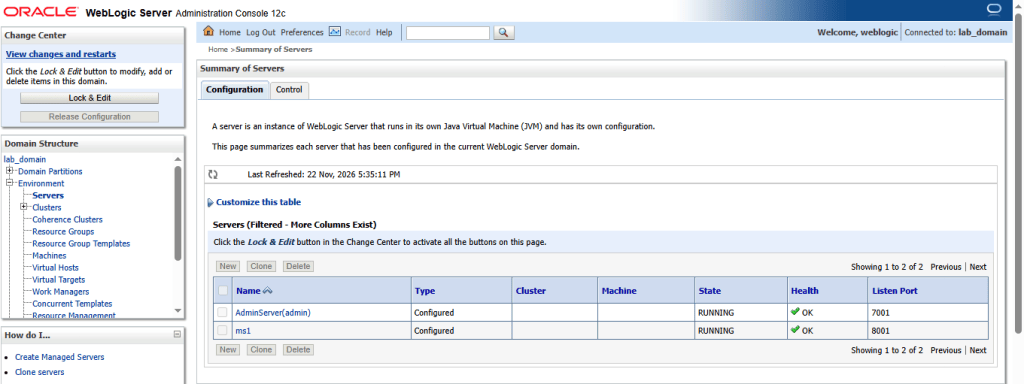
Before touching anything, I saved the baseline: a copy of config.xml, the domain-version (12.2.1.4.0) and the JAVA_HOME hard-coded in setDomainEnv.sh (jdk1.8.0_513). I then stopped both servers and took a VM snapshot.
Step 2: Check the prerequisites first
The two installers ran their own prerequisite checks. Comparing them side by side is a quick way to see what the upgrade demands from the platform. The values below are what the installers reported in this lab:
| Installer check | 12.2.1.4 | 14.1.2 |
| CertifiedVersions (expected) | oracle-6, oracle-7, redhat-6, redhat-7, SuSE-11/12/15 | oracle-8, oracle-9, redhat-8, redhat-9, SuSE-15 |
| Actual OS | oracle-8.10 (passed) | oracle-8.10 (passed) |
| CheckJDKVersion (expected) | 1.8.0_191 | 17.0 |
| Actual JDK | 1.8.0_513 (passed) | 21.0.8 (passed) |
Going by the installer checks, the OS lists overlap only through SuSE 15. In practical terms, a 12.2.1.4 domain running on Oracle Linux 7 would need a platform move before it can sit on 14.1.2. For EBS teams still running application tiers on OL7, that is a planning item in its own right.
Verify before you plan: installer checks are a minimum gate, not the full certification picture. Before using any of this for production planning, confirm the OS, kernel, JDK and WebLogic versions against Oracle’s Fusion Middleware 14.1.2 certification matrix (Supported System Configurations) and, for EBS, against the EBS certifications published by Oracle.
A note on the JDK download: my first attempt to pull JDK 21 with the script-friendly /java/21/latest/ URL returned HTTP 404. Oracle moved JDK 21 updates from October 2026 onward to the Java SE OTN license, which needs a login. The archived 21.0.8 build (July 2025, released under the earlier no-fee terms) downloaded without a login, so I used that for the lab. JDK 17 or 21 from the OTN download page, signed in, works just as well for a non-production lab. Check the licence terms that apply to your own use.
Step 3: Install 14.1.2 into a new Oracle Home
14.1.2 goes into its own home. The 12.2.1.4 home stays untouched, which keeps the rollback simple.
[ENGINE]Response File Version=1.0.0.0.0[GENERIC]ORACLE_HOME=/u01/app/oracle/middleware/wls1412INSTALL_TYPE=WebLogic ServerDECLINE_SECURITY_UPDATES=trueSECURITY_UPDATES_VIA_MYORACLESUPPORT=false
export JAVA_HOME=/u01/app/oracle/jdk/jdk-21.0.8$JAVA_HOME/bin/java -jar fmw_14.1.2.0.0_wls.jar -silent \ -responseFile /u01/app/oracle/stage/wls1412.rsp \ -invPtrLoc /u01/app/oracle/stage/oraInst.locThe installation of Oracle Fusion Middleware 14.1.2 WebLogic Server and Coherence 14.1.2.0.0 completed successfully.
Note the jar name: the 12.2.1.4 Generic download contains fmw_12.2.1.4.0_wls_lite_generic.jar, while the 14.1.2 download contains fmw_14.1.2.0.0_wls.jar. Check the name after unzipping rather than copying it from an older runbook.
Step 4: Back up the domain
ps -ef | grep -i weblogic.Server | grep -v grep # must return nothingcd /u01/app/oracle/domainstar czf /u01/app/oracle/stage/lab_domain_12214_backup.tar.gz lab_domain
With the VM snapshot and the tar backup, there were two independent ways back. The rollback section below explains how each one would be used.
Step 5: Run the Reconfiguration Wizard
For a WebLogic-only domain there are no RCU schemas, so the Upgrade Assistant is not needed. The domain itself is upgraded with the Reconfiguration Wizard from the new home. I ran the GUI through MobaXterm X11 forwarding so that every screen could be reviewed:
/u01/app/oracle/middleware/wls1412/oracle_common/common/bin/reconfig.sh \ -log=/u01/app/oracle/stage/reconfig.log -log_priority=ALL
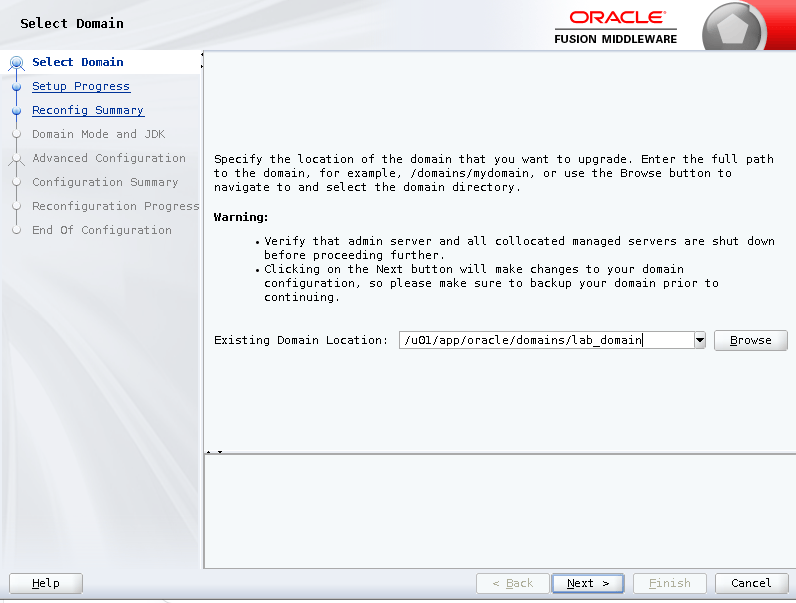
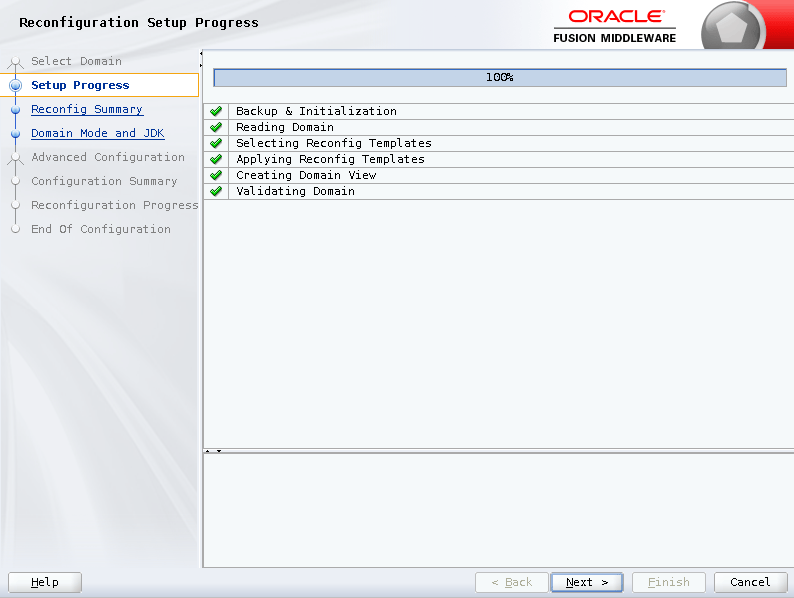
Setup Progress reads the domain, applies the reconfiguration templates and validates. All six steps passed:
The Reconfig Summary lists the domain’s template as Basic WebLogic Server Domain 12.2.1.3.0, even though the domain was built on 12.2.1.4. The base wls.jar template in 12.2.1.4 carries that template version. The domain version in config.xml was 12.2.1.4.0, so this is a label, not a sign that the wrong domain was picked up.
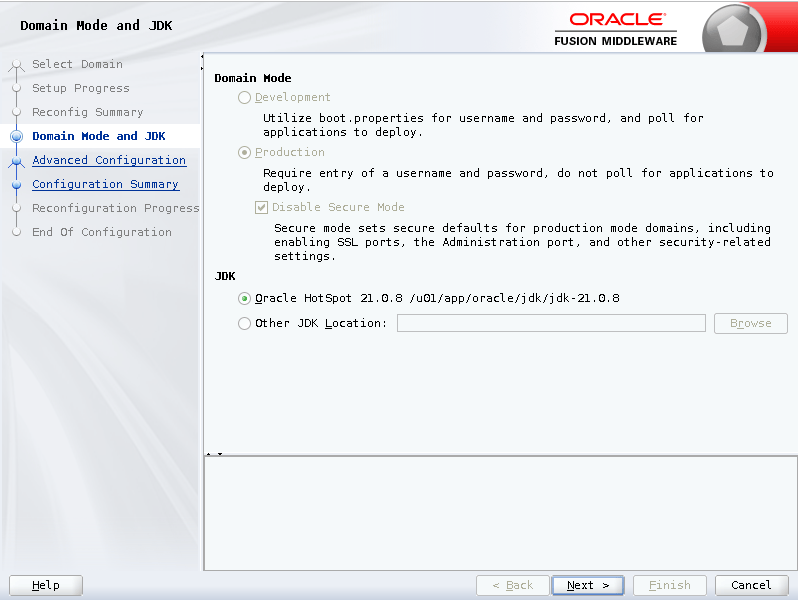
The Domain Mode and JDK page is the one to read carefully. Production mode cannot be changed here, and Disable Secure Mode is ticked and greyed out. In 14.1.2, new production domains default to secure mode, which turns on SSL and the administration port and turns off plain-text listen ports. For this upgraded domain the wizard kept secure mode disabled, so the domain kept the listen-port behaviour it had on 12.2.1.4. The JDK was set to the JDK 21.0.8 home.
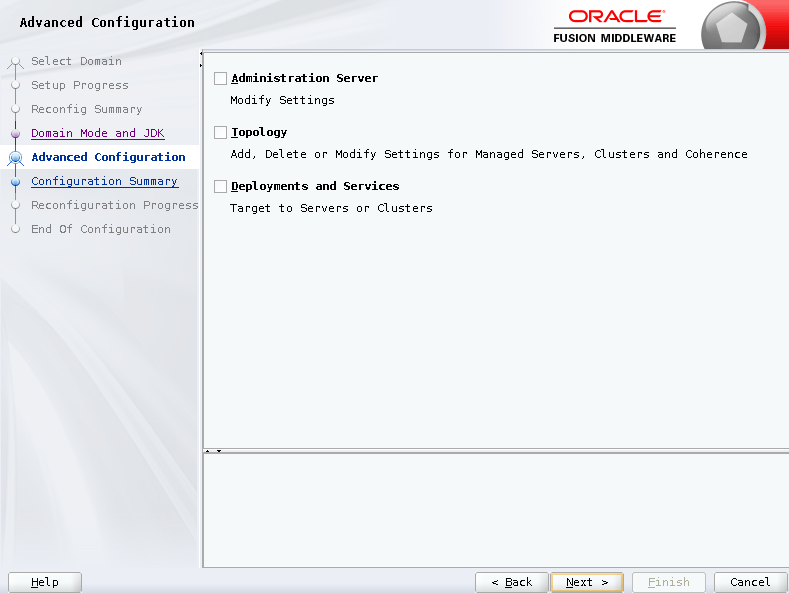
I left Advanced Configuration unticked: no changes to the AdminServer, topology or deployment targeting. The aim was a like-for-like upgrade.
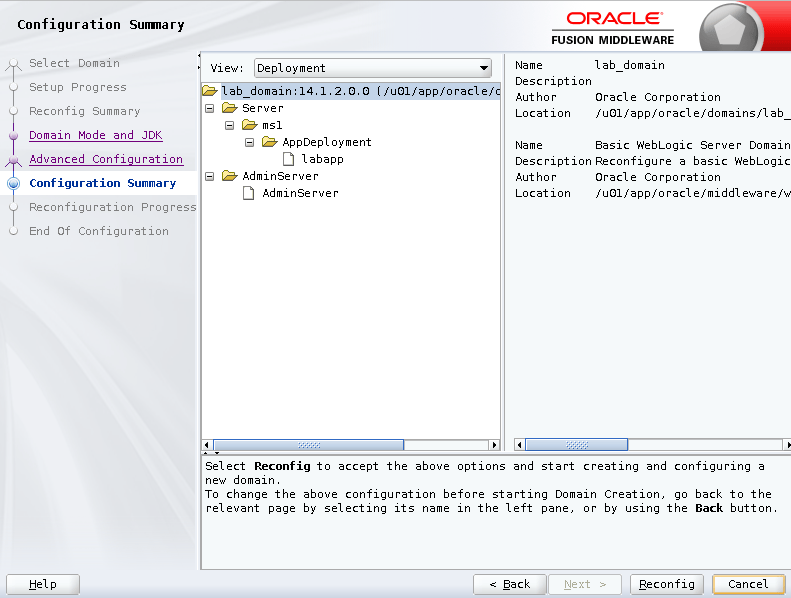
The Configuration Summary shows the target domain version 14.1.2.0.0, with labapp still targeted to ms1:
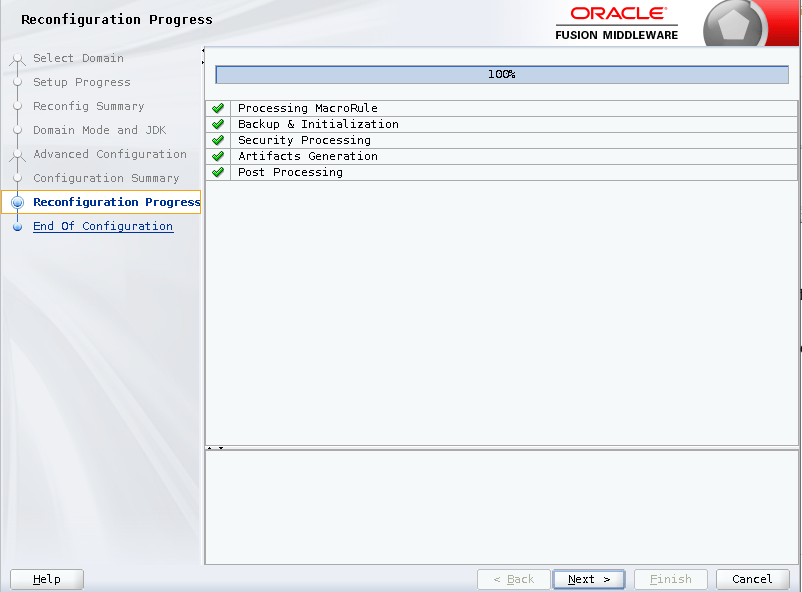
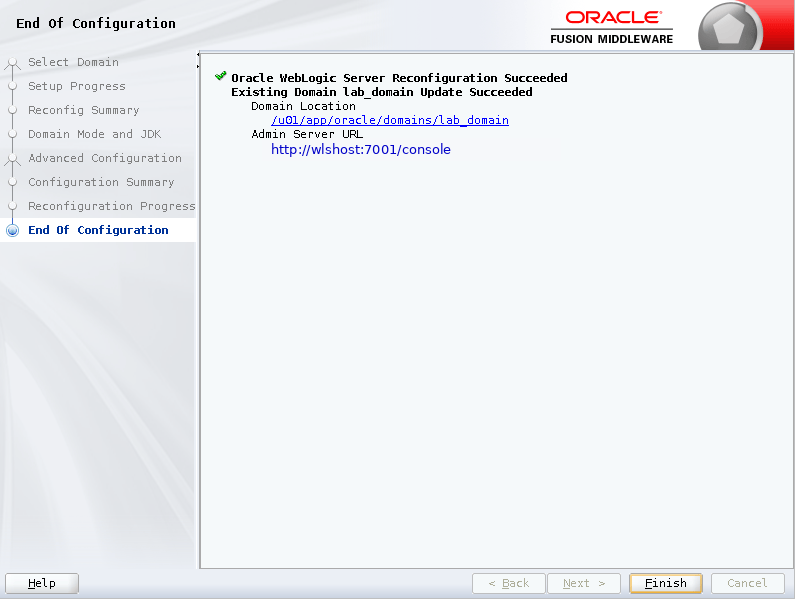
What the reconfiguration changed in the domain
| Item | Before | After |
domain-version | 12.2.1.4.0 | 14.1.2.0.0 |
production-mode-enabled | true | true |
secure-mode in config.xml | not present | <secure-mode-enabled>false</secure-mode-enabled> |
| JAVA_HOME in setDomainEnv.sh | /u01/app/oracle/jdk/jdk1.8.0_513 | /u01/app/oracle/jdk/jdk-21.0.8 |
Reading reconfig.log without panicking
Because I ran with -log_priority=ALL, the log was noisy. A grep for “error” returned lines such as:
ERROR: found unresolved prerequisite DEP for Core Application Server 14.1.2.0.0 (wls_nativeLib - 14.1.2.0.0)[UNRESOLVED|NOTINSTALLED|NOTSELECTED]
There were 220 lines containing UNRESOLVED. In this run they were logged while the installer engine worked through its component dependency tree, and they did not stop the reconfiguration. The “Failed to locate template directory” entries were FINE-level probes of optional product folders that a WebLogic-only home does not have. The lines that mattered were these:
grep -iE "SEVERE|failed|succeeded" reconfig.log | tail... ValidateDomainPhase - validation succeeded.
No SEVERE entries, and the domain validation succeeded. When you review a reconfig log, check its severity level and the validation result rather than counting the word “error”.
Step 6: Start the domain on 14.1.2 and test the application
cd $DOMAIN_HOMEnohup ./startWebLogic.sh > AdminServer_14120.out 2>&1 &cd $DOMAIN_HOME/binnohup ./startManagedWebLogic.sh ms1 t3://<admin-host>:7001 > $DOMAIN_HOME/ms1_14120.out 2>&1 &
Both servers reached RUNNING in production mode. The same labapp.war, with no rebuild and no redeploy, now reports the new stack:
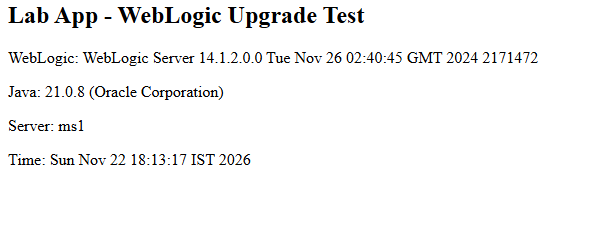
| Before | After | |
| WebLogic | 12.2.1.4.0 (Sep 2019 build) | 14.1.2.0.0 (Nov 2024 build) |
| Java | 1.8.0_513 | 21.0.8 |
| Server | ms1 | ms1 |
ما شاء الله, the test application came through unchanged. This is consistent with the documentation: WebLogic 14.1.2 is Jakarta EE 8 compatible, and Jakarta EE 8 still uses the javax.* package namespace. The move to jakarta.* comes with Jakarta EE 9 (WebLogic 15.1.1), so a javax to jakarta code migration is not part of a 12.2.1.4 to 14.1.2 upgrade.
What this test proves, and what it does not: labapp is a single JSP. It validates basic deployment, JSP compilation and execution on WebLogic 14.1.2 with Java 21. It does not demonstrate full application compatibility with Java 21. Real applications can depend on removed or encapsulated JDK internals, old libraries, JVM flags that no longer exist, data sources, JMS or security providers, none of which this test exercises.
Likewise, I did not take or analyse thread dumps, and I ran no load or performance tests. This was an upgrade validation exercise, not a performance investigation, so that was out of scope.
Rollback options
The upgrade succeeded, so I did not run a rollback. These are the planned fallback options the lab was set up with:
| Option | What it restores | How | Trade-off |
| VM snapshot (“WLS 12.2.1.4 baseline”) | The whole VM: OS, both Oracle Homes, the domain and the JDKs, exactly as they were before the upgrade | Power off the VM and restore the snapshot in VirtualBox | Fastest and most complete, but anything else changed on the VM after the snapshot is lost too |
| Domain tar backup | Only the domain directory (config.xml, start scripts, security files, deployments) | Stop all servers, move the upgraded domain aside, untar the backup, then start with the 12.2.1.4 environment (JDK 8, wls1224 home) | Works only because the 12.2.1.4 Oracle Home was left untouched. Domain changes made after the backup are lost. |
# Planned domain-level rollback (not executed in this lab)cd $DOMAIN_HOME/bin./stopManagedWebLogic.sh ms1 t3://<admin-host>:7001./stopWebLogic.shps -ef | grep -i weblogic.Server | grep -v grep # must return nothingcd /u01/app/oracle/domainsmv lab_domain lab_domain_14120_failedtar xzf /u01/app/oracle/stage/lab_domain_12214_backup.tar.gz# restored setDomainEnv.sh still points to jdk1.8.0_513 and the wls1224 homegrep -E "domain-version" lab_domain/config/config.xml
Whichever option is used, keep the old Oracle Home and the backups until the upgraded domain has been accepted. In a real environment, check the rollback steps against Oracle’s upgrade documentation for your release rather than relying on this lab sequence.
What is different after the upgrade
1. The Administration Console is gone
Opening /console no longer shows the old console. WebLogic 14.1.2 returns a welcome page saying the original administration console is not supported in 14.1.2.0.0 and has been removed, with a link to the WebLogic Remote Console.
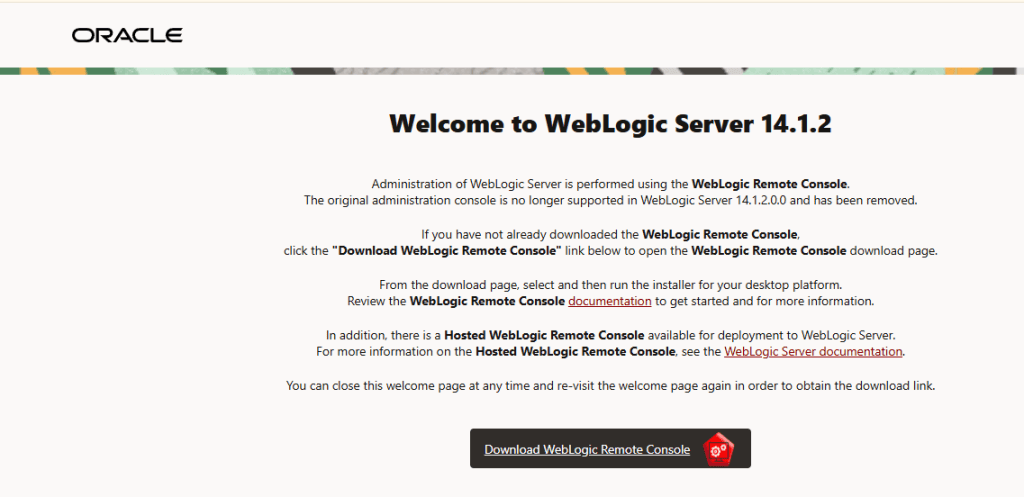
For EBS DBAs this is a habit change. Many runbooks start with “log in to the WebLogic console on port 7001” for oacore checks, data source checks or managed server restarts. Those steps will need rewriting for the Remote Console or WLST.
2. WebLogic Remote Console
The download link leads to Oracle’s oracle/weblogic-remote-console project on GitHub. I installed the 3.0.7 Windows desktop build and added an Admin Server Connection provider:
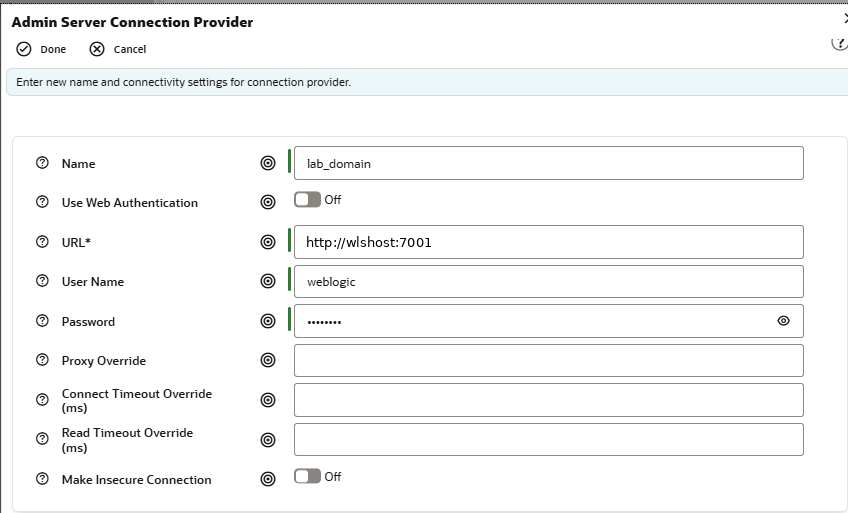
“Make Insecure Connection” controls SSL certificate checking for https:// URLs. With a plain http:// URL it was not needed. Once connected, the console is organised into four trees instead of the old single menu:
| Remote Console tree | Closest old-console equivalent |
| Edit Tree | Lock & Edit, then change configuration (changes are collected in a “shopping cart” and committed) |
| Configuration View Tree | Read-only configuration pages |
| Monitoring Tree | Monitoring tabs, server start/stop, application state |
| Security Data Tree | Users, groups, roles, policies, credentials |
Monitoring Tree → Environment → Servers is the new “Summary of Servers”, with throughput, queue and thread columns in the same table:
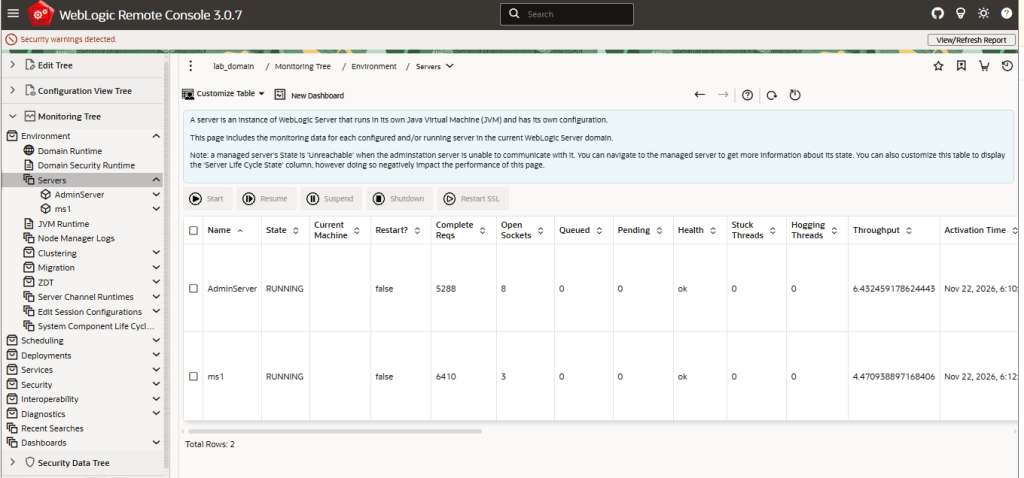
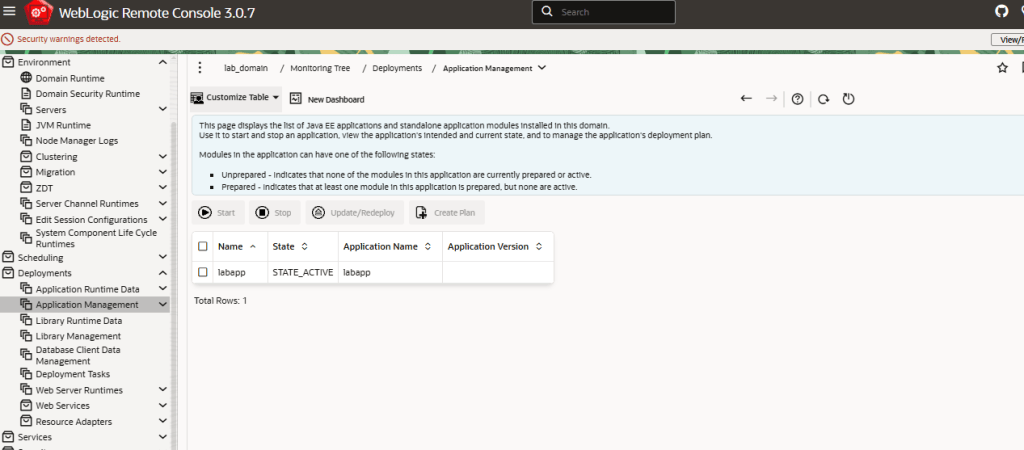
Under Application Runtime Data there is also a new system application, wls-remote-console-helper, which was not present in the 12.2.1.4 domain.
3. Security warnings are now reported
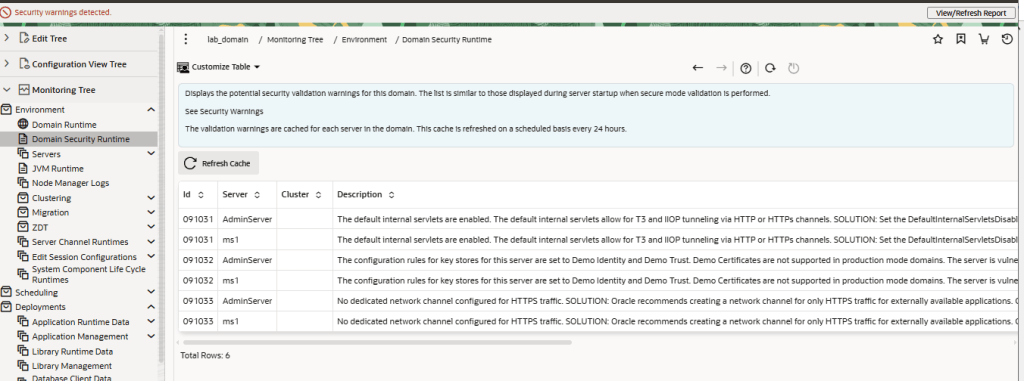
The Remote Console showed a red “Security warnings detected” banner. Monitoring Tree → Environment → Domain Security Runtime listed 14 warnings, four types each reported for AdminServer and ms1:
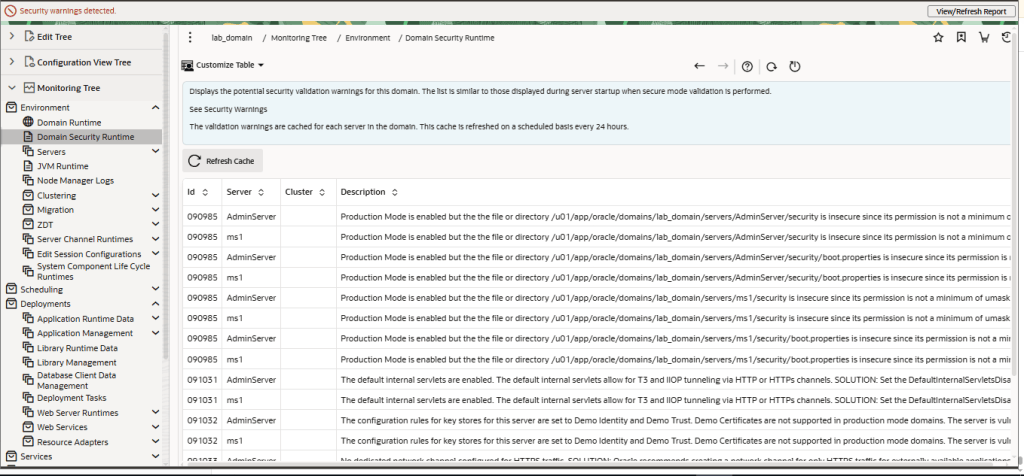
The 090985 rows came from my own setup: I created boot.properties with printf under the default umask. The fix:
chmod 750 $DOMAIN_HOME/servers/AdminServer/security $DOMAIN_HOME/servers/ms1/securitychmod 640 $DOMAIN_HOME/servers/AdminServer/security/boot.properties \ $DOMAIN_HOME/servers/ms1/security/boot.properties
After Refresh Cache, without a restart, the list dropped from 14 to 6:
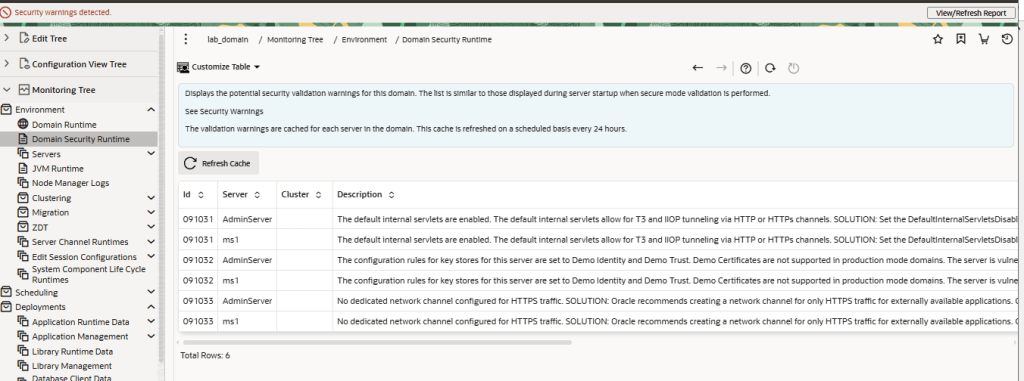
| Id | Warning | Initial | After fix | Action |
| 090985 | servers/*/security directories and boot.properties more open than umask 027 | 8 | 0 | Fixed with chmod |
| 091031 | Default internal servlets enabled (T3/IIOP tunnelling over HTTP) | 2 | 2 | Open |
| 091032 | Demo Identity and Demo Trust keystores in a production-mode domain | 2 | 2 | Open |
| 091033 | No dedicated network channel for HTTPS traffic | 2 | 2 | Open |
| Total | 14 | 6 |
This is not a hardened domain. Six warnings remain: the domain still uses the demo certificates, has no dedicated HTTPS channel, has the default internal servlets enabled and runs with secure mode disabled. Those are configuration decisions (custom keystores, an HTTPS channel, disabling internal servlets), not quick fixes, and I have left them for a separate hardening exercise. After an EBS tech-stack update to WebLogic 14c, expect a list like this to appear, and be ready to explain each item before it turns up in a security review.
4. Smaller changes worth noting
- Log timestamps: on JDK 8 the server log printed
IST. On JDK 21 the same log printsIndia Standard Time. This most likely comes from the newer JDK’s locale data rather than from WebLogic. Any log-parsing script or monitoring regex that matches on a short time-zone code should be retested. - Demo identity keystore: 14.1.2 logs that it loads DemoIdentity from a PKCS12 keystore.
- Template version label: as noted above, a 12.2.1.4 basic domain shows a 12.2.1.3.0 template in the wizard.
What this lab tells an EBS DBA, and what it does not
What it shows:
- In this lab, the 14.1.2 installer accepted only OL/RHEL 8 and 9 (plus SuSE 15) and required JDK 17 or later. OS and JDK readiness come first. Confirm them against the certification matrix.
- The classic console is gone. Admin runbooks and team habits need to move to the Remote Console or WLST.
- Secure mode exists, and in this upgrade it stayed disabled. Know where that setting lives in
config.xml. - 14.1.2 reports security warnings you did not see on 12c. Expect questions about them.
What it does not show: anything about the EBS-specific procedure. The manifest, migration patch, Technology Stack Update Assistant, Forms 14c and OHS 14c are outside this lab, and the EBS application tier starts from WebLogic 10.3.6, not 12.2.1.4. For that part, follow Oracle’s EBS Next Gen Tech Stack FAQ (My Oracle Support article KA1014) and the related readiness documentation.
Checklist I would reuse
- Confirm OS and JDK (17 or 21) against the 14.1.2 certification matrix, not only the installer checks.
- Capture a baseline:
config.xml, domain version, JAVA_HOME, deployed apps and their state. - Stop all servers and confirm with
ps. Back up the domain, take a snapshot if you can, and keep the old Oracle Home. - Write down the rollback steps before starting.
- Install 14.1.2 into a new home and run
reconfig.shfrom it. - Review the Domain Mode and JDK page carefully. Decide on secure mode deliberately.
- Check reconfig.log for SEVERE entries and the validation result.
- Start the servers, test the real applications (not just a sample), and compare with the baseline.
- Install the Remote Console and review the Domain Security Runtime warnings.
- Update runbooks, monitoring scripts and log parsers.
Next in this lab series: WebLogic 14.1.2 Security Hardening: Configuring Custom Identity and Trust Keystores, HTTPS and Disabling Internal Servlets, to clear the remaining six warnings. After that, I plan to look more closely at what Oracle has published about preparing EBS 12.2 for the Next Generation Technology Stack.
Sources
WebLogic Server 14.1.2
- Upgrading Oracle WebLogic Server 14.1.2 (documentation library)
- Upgrading Oracle WebLogic Server: Introduction and supported upgrade scenarios
- What’s New in Oracle WebLogic Server 14.1.2.0.0
- WebLogic Server 14.1.2 Compatibility (Jakarta EE 8)
- What’s New in Oracle WebLogic Server 15.1.1.0.0 (Jakarta EE 9.1 and the jakarta.* namespace)
- Oracle Fusion Middleware Supported System Configurations
- WebLogic Server installers downloads
- WebLogic Remote Console releases (GitHub)
Oracle E-Business Suite 12.2 Next Generation Technology Stack
- Update: EBS 12.2 Application Technology Stack Roadmap (Oracle EBS Technology blog)
- EBS 12.2 Application Technology Stack Update: Terminology and Concepts, Part I
- OATUG and Oracle: Guide to the Oracle E-Business Suite 12.2 Next Generation Technology Stack
- Oracle EBS Technology Stack Certifications summary
- FAQ: Oracle E-Business Suite Next Generation Technology Stack (My Oracle Support article KA1014, login required)
Java licensing
This was done in a personal home lab on non-production software. It is a learning exercise, not an Oracle-supported EBS upgrade procedure. Check Oracle’s certification matrix and official documentation before planning any production upgrade.
