Alhamdulillah. In my last Data Guard post, Oracle Data Guard on 26ai in a Home Lab: Standby Build, Switchover, Failover and Reinstate, I built a 26ai physical standby and ran switchover, failover and reinstate by hand. This time I wanted the database to make the failover decision on its own. I enabled Fast-Start Failover (FSFO) with an Observer on a third machine, disconnected the primary’s network, and recorded what happened at each step.
LAB VERIFIED — everything below was run in my home lab. Timings are from the Observer log and DGMGRL output, not estimates. Hostnames and IP addresses are masked.
Lab setup
| Host | Database | Role |
|---|---|---|
| dbhost1 | CDB26 (PDB26) | Primary |
| dbhost2 | CDB26_SB | Physical standby, FSFO target |
| obshost | — | Observer (dgmgrl from a 26ai home) |
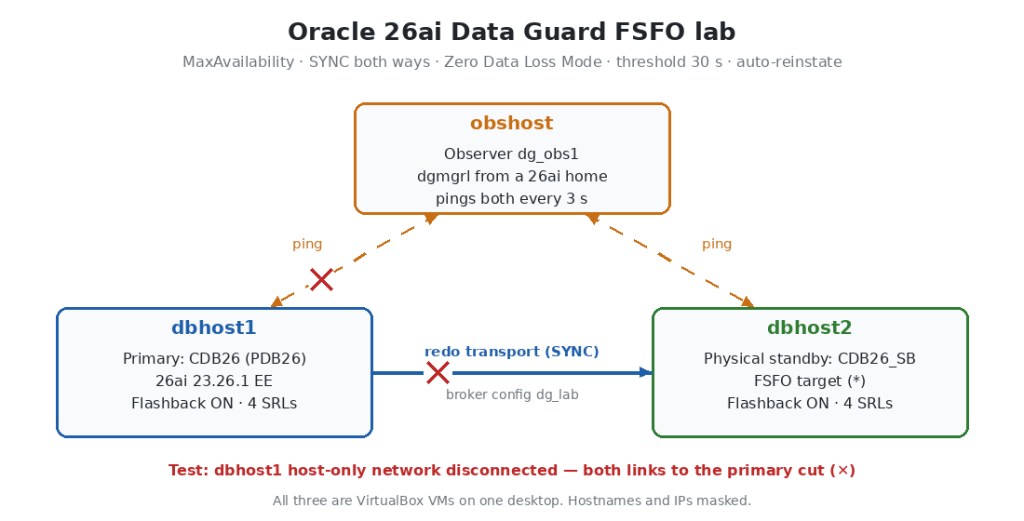
All three are VirtualBox VMs on one Windows desktop, running Oracle AI Database 26ai Enterprise Edition 23.26.1 on Oracle Linux. The Data Guard Broker configuration is called dg_lab.
Licensing note: FSFO and the Observer are part of Data Guard in Enterprise Edition. I did not open the standby read-only with apply running, which would need the Active Data Guard option.
Before you start: a standby that was powered off for two days
My standby VM had been off since the previous switchover test. Getting the configuration back to SUCCESS took five fixes before I could touch FSFO:
- Clock drift. The standby clock was about 10 minutes behind the primary. I enabled
chronydon all three VMs and ranchronyc makestep. Without this, failover timings across hosts would not line up. - Broker showed the standby as disabled with
ORA-16906: The member was shutdown. ENABLE DATABASEfailed with ORA-16631 (“operation requires shutdown of database or instance”). A cleanSHUTDOWN IMMEDIATE/STARTUP MOUNTon the standby, then enabling it again, worked.- Standby listener was not running after the VM boot, giving
ORA-12541andORA-16778on the primary.lsnrctl startfixed it. - Redo transport stayed in error after the listener came back. Toggling transport cleared it straight away instead of waiting for the retry interval.
EDIT DATABASE 'CDB26' SET STATE='TRANSPORT-OFF';EDIT DATABASE 'CDB26' SET STATE='TRANSPORT-ON';
After that, SHOW DATABASE cdb26_sb showed transport and apply lag at 0 seconds and the configuration was back to SUCCESS.
Step 1: Prechecks on both databases
FSFO needs Flashback Database on both sides (so the old primary can be reinstated), a Fast Recovery Area, the broker running, and standby redo logs — one more group than the online logs, same size.
SET LINES 200 PAGES 100COL db_unique_name FORMAT A14COL database_role FORMAT A16COL flashback_on FORMAT A12COL protection_mode FORMAT A20SELECT db_unique_name, database_role, flashback_on, protection_mode FROM v$database;COL name FORMAT A28COL value FORMAT A45SELECT name, NVL(value,'-') value FROM v$parameterWHERE name IN ('db_recovery_file_dest','db_recovery_file_dest_size','dg_broker_start','db_create_file_dest');COL type FORMAT A8COL mb FORMAT 99999SELECT 'ONLINE' type, thread#, COUNT(*) groups, MAX(bytes)/1024/1024 mb FROM v$log GROUP BY thread#UNION ALLSELECT 'STANDBY', thread#, COUNT(*), MAX(bytes)/1024/1024 FROM v$standby_log GROUP BY thread#;
DB_UNIQUE_NAME DATABASE_ROLE FLASHBACK_ON PROTECTION_MODE-------------- ---------------- ------------ --------------------CDB26 PRIMARY YES MAXIMUM PERFORMANCENAME VALUE---------------------------- ---------------------------------------------db_create_file_dest -db_recovery_file_dest /u01/app/oracle/fradb_recovery_file_dest_size 21474836480dg_broker_start TRUETYPE THREAD# GROUPS MB-------- ---------- ---------- ------ONLINE 1 3 200STANDBY 1 4 200
The standby returned the same values (role PHYSICAL STANDBY). Both were already prepared, so no changes were needed here.
Step 2: Prepare the Observer host
The broker uses the TNS aliases CDB26 and CDB26_SB, and those resolve to the database hostnames. The Observer host needs both. I added the two hostnames to /etc/hosts on obshost, then the aliases to the 26ai home’s tnsnames.ora:
CDB26 = (DESCRIPTION = (ADDRESS = (PROTOCOL = TCP)(HOST = dbhost1)(PORT = 1521)) (CONNECT_DATA = (SERVER = DEDICATED)(SERVICE_NAME = CDB26)) )CDB26_SB = (DESCRIPTION = (ADDRESS = (PROTOCOL = TCP)(HOST = dbhost2)(PORT = 1521)) (CONNECT_DATA = (SERVER = DEDICATED)(SERVICE_NAME = CDB26_SB)(UR = A)) )
Checked with tnsping CDB26, tnsping CDB26_SB and dgmgrl sys@CDB26 "show configuration" from obshost — all OK.
Step 3: Broker settings
EDIT DATABASE 'CDB26' SET PROPERTY LogXptMode='SYNC';EDIT DATABASE 'cdb26_sb' SET PROPERTY LogXptMode='SYNC';EDIT CONFIGURATION SET PROTECTION MODE AS MaxAvailability;EDIT DATABASE 'CDB26' SET PROPERTY FastStartFailoverTarget='cdb26_sb';EDIT DATABASE 'cdb26_sb' SET PROPERTY FastStartFailoverTarget='CDB26';EDIT CONFIGURATION SET PROPERTY FastStartFailoverThreshold=30;EDIT CONFIGURATION SET PROPERTY FastStartFailoverAutoReinstate=TRUE;
- SYNC + MaxAvailability: the primary waits for the standby to acknowledge redo before a commit completes. This is what allows zero data loss mode.
- FastStartFailoverTarget is set on both sides so FSFO still works after a role change.
- Threshold 30: the Observer waits 30 seconds without contact before it fails over.
- AutoReinstate TRUE: when the old primary comes back, the Observer converts it into a standby.
The configuration came back as MaxAvailability with SUCCESS.
Step 4: Start the Observer and enable FSFO
On obshost, in its own session (I typed the password at the prompt so it does not show up in ps):
cd /u01/app/oracle/dgobsdgmgrl sys@CDB26
START OBSERVER dg_obs1 FILE IS '/u01/app/oracle/dgobs/fsfo.dat' LOGFILE IS '/u01/app/oracle/dgobs/obs1.log';

One thing that caught me out: with LOGFILE IS set, the Observer writes its messages to that file, not to the screen. During the test the Observer window stayed silent, and I had to tail -f obs1.log from a second session to see what it was doing.
Then, from the primary:
ENABLE FAST_START FAILOVER;SHOW FAST_START FAILOVER;SHOW OBSERVER;
Fast-Start Failover: Enabled in Zero Data Loss Mode Protection Mode: MaxAvailability Lag Limit: 0 seconds Lag Type: APPLY Threshold: 30 seconds Ping Interval: 3000 milliseconds Active Target: cdb26_sb Observer: dg_obs1 Shutdown Primary: TRUE Auto-reinstate: TRUEObserver "dg_obs1" - Master Host Name: obshost Last Ping to Primary: 0 seconds ago Last Ping to Target: 2 seconds ago Log File: /u01/app/oracle/dgobs/obs1.log State File: /u01/app/oracle/dgobs/fsfo.dat
A warning about VM snapshots
Before testing I wanted live VirtualBox snapshots. A live snapshot pauses the VM while it saves memory. If the primary pauses for longer than the 30-second threshold, the Observer will fail over before you are ready. I ran DISABLE FAST_START FAILOVER; first, took the snapshots, then enabled it again. Even so, the primary’s alert log recorded the pause:
--ATTENTION--The system is observing online redo log writes that are taking longer thanexpected to complete. This can lead to system performance instability.

The test: disconnect the primary
First, a marker row on the primary, so I could prove later whether anything was lost:
CREATE TABLE system.fsfo_test (id NUMBER, note VARCHAR2(50), ts TIMESTAMP DEFAULT SYSTIMESTAMP);INSERT INTO system.fsfo_test (id, note) VALUES (1, 'before network cut');COMMIT;
        ID NOTE                      TS
---------- ------------------------- ------------------------------
         1 before network cut        22-NOV-26 07.32.46.507991 AM
I had tail -f running on both alert logs and on the Observer log. The standby was applying redo in real time from its standby redo log:

Then I unticked Cable Connected on the primary VM’s host-only adapter (Settings → Network → Adapter 2 → Advanced). The NAT adapter stayed connected; only the network the databases and Observer use was cut.
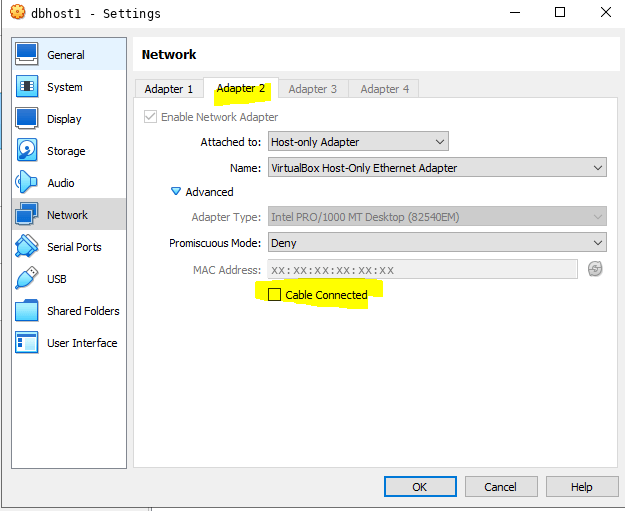
From obshost, ping to the primary returned Destination Host Unreachable. The Observer log:
[W000 2026-11-22T07:37:42.736+05:30] Primary database cannot be reached.[W000 2026-11-22T07:37:59.001+05:30] Primary database cannot be reached.[W000 2026-11-22T07:37:59.001+05:30] Connection attempt since 07:37:29 has failed.[W000 2026-11-22T07:37:59.001+05:30] Fast-Start Failover threshold has expired.[W000 2026-11-22T07:37:59.011+05:30] Entering FAILOVER state[W000 2026-11-22T07:37:59.011+05:30] Check if the standby is ready for failover.[S012 2026-11-22T07:37:59.026+05:30] Fast-Start Failover started...Initiating Fast-Start Failover to database "cdb26_sb"...Performing failover NOW, please wait...Failover succeeded, new primary is "cdb26_sb".Failover processing complete, broker ready.[S012 2026-11-22T07:38:54.344+05:30] Fast-Start Failover finished...
The first failed connection attempt was at 07:37:29. The threshold expired exactly 30 seconds later, and the failover itself took 55 seconds. The broker then showed:
Configuration - dg_lab Protection Mode: MaxAvailability Members: cdb26_sb - Primary database CDB26 - (*) Physical standby database (disabled) ORA-16661: The standby database must be reinstated.Fast-Start Failover: Enabled in Zero Data Loss Mode
Was anything lost?
I queried the marker table on the new primary (PDB26 on dbhost2):
        ID NOTE                      TS
---------- ------------------------- ------------------------------
         1 before network cut        22-NOV-26 07.32.46.507991 AM
The row committed on the old primary was there, with the same timestamp to the microsecond. In MaxAvailability with SYNC transport, a commit completes only after the standby acknowledges the redo, so this row was already safe on the standby before the cable was pulled. To be precise about what this shows: one row proves that this committed transaction survived the failover. It does not by itself prove the same for every transaction under a busy workload. A test with a continuous insert loop, comparing the last committed row on each side, would show that.
Automatic reinstate
While the cable was still out, the Observer kept retrying the old primary every second and logging ORA-12543: TNS:destination host unreachable. I ticked Cable Connected again and checked the old primary:
[oracle@dbhost1 ~]$ ps -ef | grep pmon | grep -v grep[oracle@dbhost1 ~]$
No instance was running. That fits the Shutdown Primary: TRUE setting: a primary that loses contact with both the Observer and the standby shuts itself down, so two primaries cannot accept writes at the same time. I did not capture the primary’s alert log for that moment, so I am basing this on the setting and the result, not on a log line.
This is worth knowing before you rely on it: FastStartFailoverAutoReinstate=TRUE did not bring the old primary back by itself in this test. The instance was down, and nothing restarted it. The Observer can only reinstate a database it can connect to, so I started it in MOUNT mode:
STARTUP MOUNT
The Observer took it from there:
[W000 2026-11-22T07:44:42.956+05:30] Connection to the new standby restored![W000 2026-11-22T07:44:45.972+05:30] Connection to the primary restored![W000 2026-11-22T07:44:47.979+05:30] New primary is now ready to reinstate.[W000 2026-11-22T07:44:47.979+05:30] Issuing REINSTATE command.Initiating reinstatement for database "CDB26"...Reinstating database "CDB26", please wait...Reinstatement of database "CDB26" succeededReinstate processing complete, broker ready.[W000 2026-11-22T07:45:30.557+05:30] Successfully reinstated database CDB26.
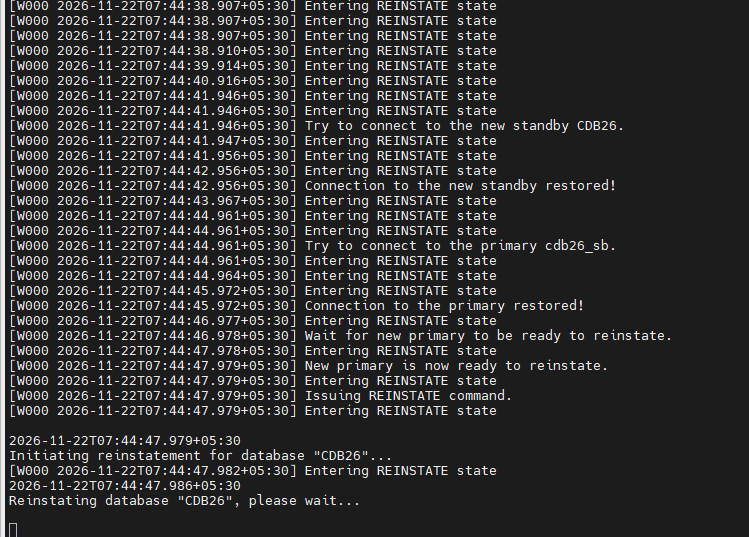
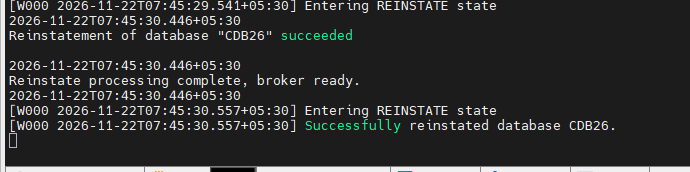
Right after the reinstate, the configuration briefly showed ORA-16817: unsynchronized fast-start failover configuration and ORA-16854: apply lag could not be determined. Both cleared within about a minute once SYNC transport caught up. SHOW DATABASE CDB26 already showed transport and apply lag at 0 seconds.
Switchback
To return to the original layout, I switched over to CDB26 with FSFO still enabled (switching over to the FSFO target is allowed):
DGMGRL> SWITCHOVER TO 'CDB26';2026-11-22T07:47:30.415+05:30Performing switchover NOW, please wait......New primary database "CDB26" is opening...Operation requires start up of instance "CDB26" on database "cdb26_sb"Starting instance "CDB26"...Database mounted.2026-11-22T07:47:57.895+05:30Switchover succeeded, new primary is "CDB26"
The first status check showed ORA-12537: TNS:connection closed for the standby, because it was still restarting. A minute later:
Configuration - dg_lab Protection Mode: MaxAvailability Members: CDB26 - Primary database cdb26_sb - (*) Physical standby databaseFast-Start Failover: Enabled in Zero Data Loss ModeConfiguration Status:SUCCESS
Results
| Measure | Time | Result |
|---|---|---|
| First failed Observer contact | 07:37:29 | — |
| Threshold expired, failover started | 07:37:59.0 | 30 s detection |
| Failover complete | 07:38:54.3 | 55 s failover, about 85 s total |
| Data loss | — | None for the committed marker row |
Reinstate issued (after manual STARTUP MOUNT) | 07:44:47.9 | — |
| Reinstate complete | 07:45:30.4 | about 42 s reinstate after manual STARTUP MOUNT |
| Switchback | 07:47:30.4 to 07:47:57.9 | 27.5 s |
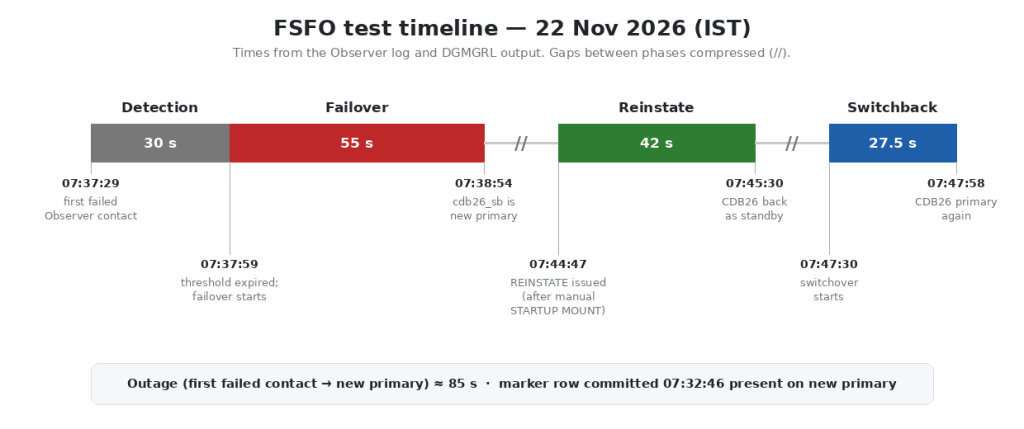
These numbers come from three small VMs on one desktop with almost no workload. Treat them as an example of the sequence, not as figures to expect in production. Real failover time depends on redo still to apply, storage speed and the threshold you choose.
Production considerations
I did not test these in the lab. They are what I would check before relying on FSFO in production:
- Test under load. Failover time grows with the redo still to apply on the standby. An idle lab tells you the sequence, not the duration you will see with a busy primary.
- Choose the threshold deliberately. 30 seconds suited this lab. In production, a short threshold reduces downtime but raises the risk of failing over on a brief network blip; a long one does the opposite.
- Place the Observer at a third location, not in the primary or standby data centre. Data Guard also supports more than one Observer, so the Observer itself is not a single point of failure.
- Plan the application side. A database failover does not move client connections by itself. Clients need role-based services and connect-time failover; that is the next test in this series.
- Plan for the isolated primary. Here it shut itself down and needed a manual
STARTUP MOUNTbefore reinstate. Monitoring and runbooks should cover who starts it and when.
What I learned
- Get the configuration clean first. A standby that has been down for days needs attention before FSFO: clocks, listener, broker state, transport.
- Put the Observer on a third host. Only an independent host can tell the difference between “the primary is down” and “the link between the two databases is down”.
- Read the Observer log, not its window, when
LOGFILE ISis used. - Disable FSFO before anything that pauses the primary, such as live VM snapshots.
- Auto-reinstate still needed one manual step here. The isolated primary shut itself down, and I had to start it in MOUNT mode before the Observer could reinstate it.
- Check data loss with your own data. A committed marker row is a quick, concrete check for one transaction. For a stronger test, run a continuous insert loop through the failure and compare the last committed row on each side.
ما شاء الله, watching the Observer take over on its own, with the committed marker row intact on the new primary, was a satisfying result for a home lab. Next in this series: switchover with live client sessions, using a role-based service.
