Alhamdulillah, I completed my first full online patching cycle in my EBS 12.2.12 Vision home lab. There was no patch to apply. It was an empty ADOP cycle: prepare, finalize, cutover and cleanup with nothing in between, followed by an fs_clone.
I don’t have My Oracle Support access for this lab, so real EBS patches are out of reach. An empty ADOP cycle is useful for understanding the Oracle E-Business Suite 12.2 online patching workflow without introducing any application patch changes.
Even without applying a patch, the cycle exercises important operations: patch edition creation, patch file system synchronization, AutoConfig execution, database and file system cutover, application tier restart, and cleanup.
This home lab exercise gave me an opportunity to independently execute and document a complete ADOP cycle in a controlled environment. It also allowed me to examine the phase execution, review configuration warnings, validate file system switching, and capture the entire process with actual commands and screenshots.
Although the ADOP session status displays the APPLY phase as COMPLETED, no application patch was applied during this exercise. I proceeded directly from PREPARE to FINALIZE because there were no patches to apply.
The lab build itself is covered in my earlier post: Oracle EBS 12.2.12 Vision on VirtualBox (Windows home lab).
Lab environment and patch-level baseline
| Item | Value |
|---|---|
| EBS | 12.2.12 Vision, single node, Oracle VM Virtual Appliance on VirtualBox |
| OS | Oracle Linux 7.9 |
| AD / TXK | C.Delta.14 |
| Database | 19c, 19.18.0.0.230117 RU + OJVM 19.18 (CDB EBSCDB, PDB EBSDB) |
| WebLogic | 10.3.6.0 with PSU 10.3.6.0.230117 |
| JDK (apps tier) | 1.7.0_371 |
| Last adop session before this | Session 27, FS_CLONE, April 2023 (shipped with the appliance) |
Most of the technology stack remains at the January 2023 patch levels shipped with the appliance. I am not claiming a specific EBS CPU level here, since confirming that needs the patch lists from MOS.
Pre-execution preparation
- Snapshot. My latest VirtualBox snapshot was taken with the VM shut down cleanly, and I had only run read-only checks since, so I used it as the rollback point.
- Passwords. adop asks for three: APPS, EBS_SYSTEM and the WebLogic admin user. From AD/TXK Delta 13 onwards it asks for EBS_SYSTEM instead of SYSTEM.
- Space. Check free space on the file system that holds fs1, fs2 and fs_ne.

VM running on the baseline snapshot
Step 1: Pre-checks
. /u01/install/APPS/EBSapps.env runecho $FILE_EDITIONecho $RUN_BASEps -ef | grep pmon | grep -v grepss -ltn | grep -E ':8000|:7001'df -h /u01adop -status
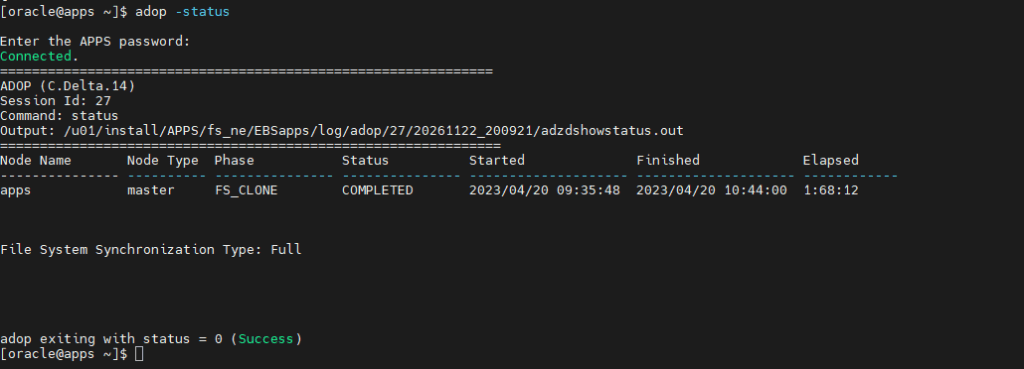
No open session; the last one is the shipped FS_CLONE from 2023
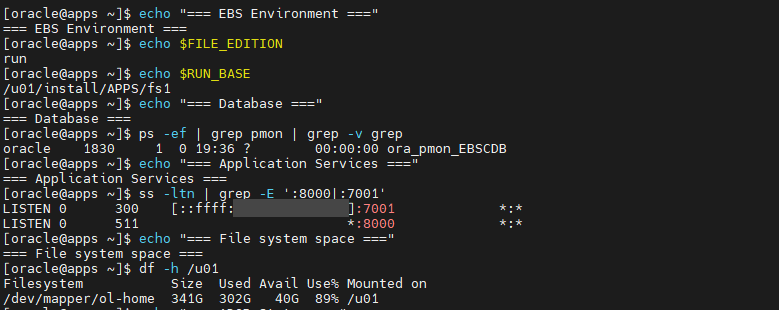
Run edition on fs1, database instance up, OHS web port 8000 and WebLogic Administration Server port 7001 listening, 40 GB free on /u01
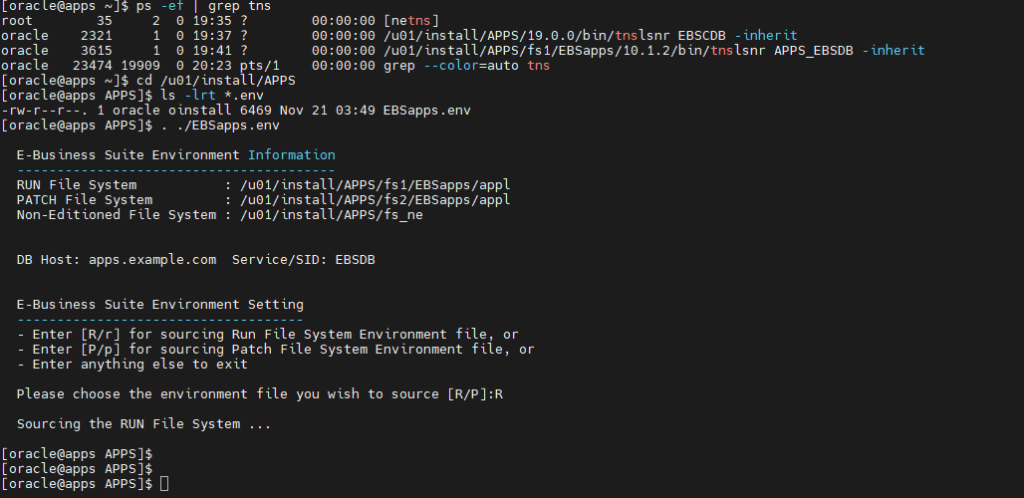
Database TNS listener (EBSCDB) and apps TNS listener (APPS_EBSDB) running; EBS run environment sourced on fs1
Everything was in order: run file system fs1, database instance running, the database and apps TNS listeners up, OHS (port 8000) and WebLogic Administration Server (port 7001) listening, no open ADOP session and 40 GB free.
Step 2: PREPARE
time adop phase=prepare
I prefixed every adop phase command with time, so each phase ends with its real, user and sys times. That is where the timings later in this post come from. I also kept adopmon running in a second session. It prints the adop events as they happen, which is far easier to follow than tailing log files.
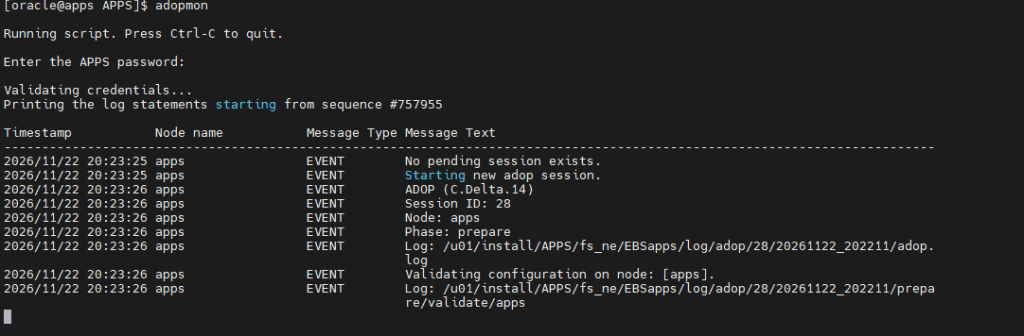
adopmon: session 28 started, validating configuration
Two messages caught my eye:
- Configuration change detected (file system configuration changes). Most likely this came from my earlier edit of
s_wls_admin_console_access_nodesin the context files for WebLogic console access. Prepare carried on normally. - Waiting for conflicting requests to complete. Prepare submits the ADZDPATCH concurrent program, which cannot start while incompatible requests are running. It waited about a minute and then continued.
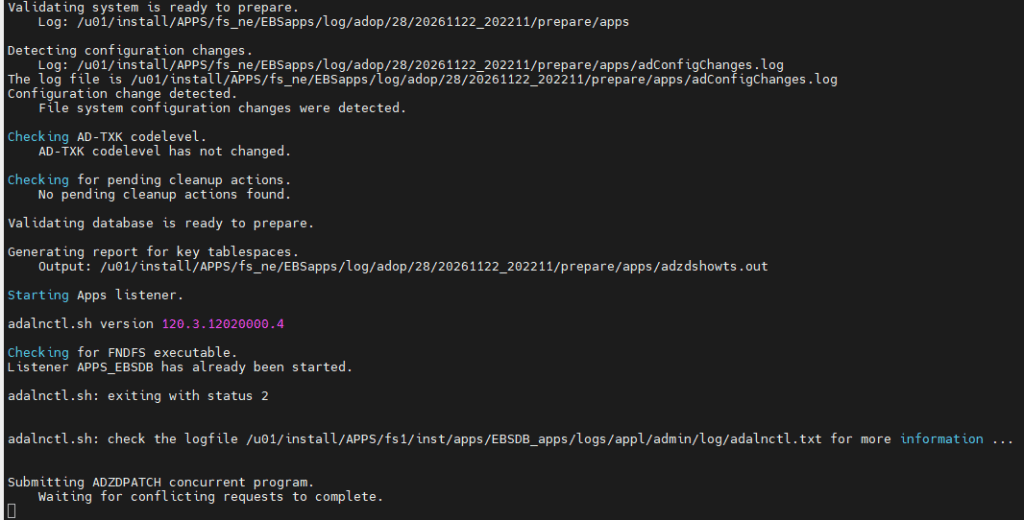
Configuration change detected, then ADZDPATCH waiting for conflicting requests
adalnctl.sh exited with status 2 here. The apps listener was already running at that point, so in this run I read it as the “already started” result rather than a failure.
After that, prepare created the patch edition V_20261122_2025, prepared the seed tables needed for AutoConfig, synchronized fs2 with fs1, ran AutoConfig on the patch file system and stopped the patch file system’s WebLogic services.

Patch edition created and seed tables prepared
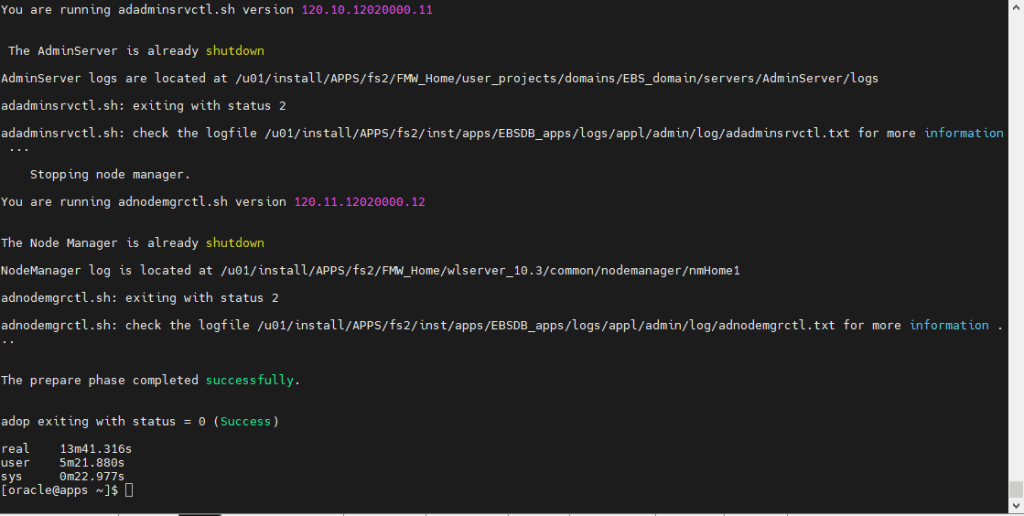
Prepare completed successfully in 13m41s
Step 3: FINALIZE
With nothing to apply, I proceeded directly to finalize.
time adop phase=finalize
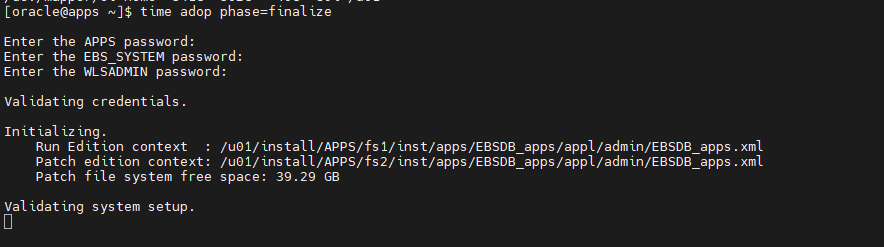
Finalize: run context fs1, patch context fs2, 39.29 GB free
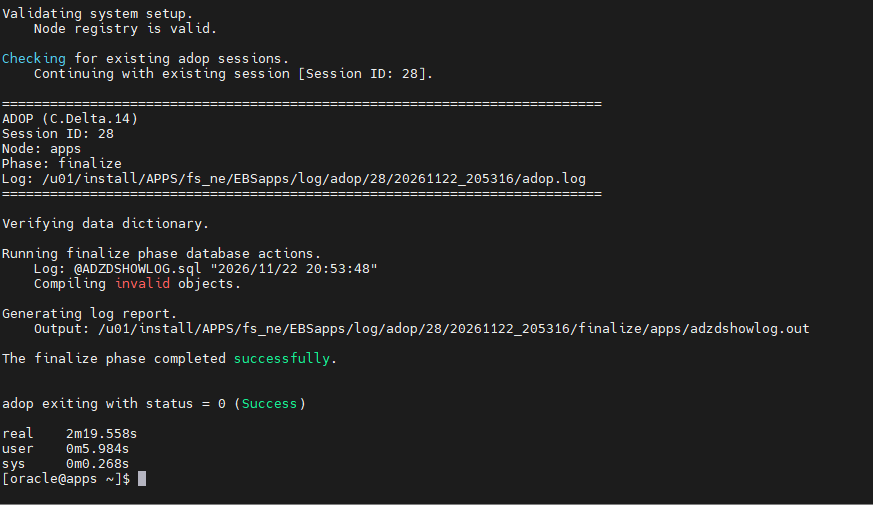
Finalize compiled invalid objects and completed in 2m19s
adopmon showed one WARNING during validation:
MTCC: The following middle tier fixes have not been applied: 33560682 for component:WLS_HOME
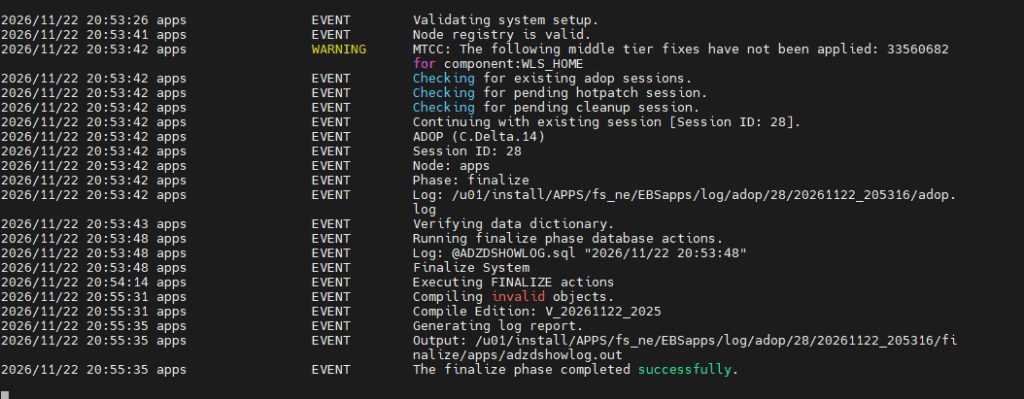
MTCC warning for WebLogic fix 33560682
This comes from the middle tier certification check (MTCC). adop compares the middle tier homes against the fixes expected for this AD/TXK level and reports what is missing. It did not stop the cycle. I can’t download that patch without MOS, so I have recorded it as a known gap for this lab.
Step 4: Check concurrent requests before cutover
Cutover shuts down the concurrent managers, so I checked what was running first:
SET LINES 180 PAGES 100COL request_id FORMAT 99999999COL program FORMAT A45COL phase FORMAT A6COL status FORMAT A6COL requestor FORMAT A12COL started FORMAT A20COL next_run FORMAT A20SELECT r.request_id, NVL(p.user_concurrent_program_name,'-') program, NVL(r.phase_code,'-') phase, NVL(r.status_code,'-') status, NVL(u.user_name,'-') requestor, NVL(TO_CHAR(r.actual_start_date,'DD-MON-YY HH24:MI:SS'),'-') started, NVL(TO_CHAR(r.requested_start_date,'DD-MON-YY HH24:MI:SS'),'-') next_runFROM fnd_concurrent_requests r, fnd_concurrent_programs_tl p, fnd_user uWHERE r.concurrent_program_id = p.concurrent_program_idAND r.program_application_id = p.application_idAND r.requested_by = u.user_idAND p.language = 'US'AND r.phase_code IN ('R','P')ORDER BY r.phase_code DESC, r.requested_start_date;

Only ‘Online Patching In Progress’ running; Workflow schedules pending
The only running concurrent request in my query was Online Patching In Progress (ADZDPATCH), submitted during the prepare phase. The remaining requests were my scheduled Workflow jobs. I checked these before cutover because the concurrent manager shutdown and any running requests can affect the cutover.
Production Change Approval and CUTOVER Readiness
In this lab I ran cutover on my own, because it is a personal environment. On a production Oracle E-Business Suite system, cutover is a controlled change. Unlike prepare and finalize, it involves application-tier downtime: application services and concurrent managers are stopped, the database edition and file systems are switched, and services are restarted on the new run file system. Before running it in production, I would make sure of the following:
- Approved change request: an approved change ticket with the required technical and business approvals.
- Maintenance window: the cutover schedule and expected downtime agreed with the application owner and business stakeholders.
- Stakeholder communication: users, functional teams, business owners and support teams notified.
- Users and external connections cleared: users logged out, and third-party integrations or processes connected to the old run edition stopped before cutover. Otherwise those sessions can be terminated during cutover.
- Pre-cutover validation: prepare and finalize completed successfully, and the adop logs reviewed for warnings or errors.
- Concurrent requests: running and pending requests reviewed, as in Step 4.
- Backup and recovery readiness: backup status confirmed and the documented recovery approach understood.
- Support readiness: DBA, application, middleware and infrastructure teams available during the window.
- Post-cutover validation plan: login, concurrent managers, Workflow, WebLogic, listeners and key business flows defined in advance.
Rollback consideration: adop phase=abort is available only before cutover is initiated. Once cutover has taken place, that patching cycle can no longer be reversed with abort, so production backup and recovery procedures must be reviewed before the maintenance window starts.
Formal change approval is an organizational control rather than an adop requirement. Even so, on a production system adop phase=cutover should never be run without the required approvals, and only within the agreed maintenance window.
Step 5: CUTOVER
time adop phase=cutover
Cutover submitted the ICM shutdown, cancelled ADZDPATCH and waited for the Internal Concurrent Manager to go down. In another session, this showed when all manager processes had exited:
ps -ef | grep -E 'FNDLIBR|FNDSM' | grep -v grep | wc -l
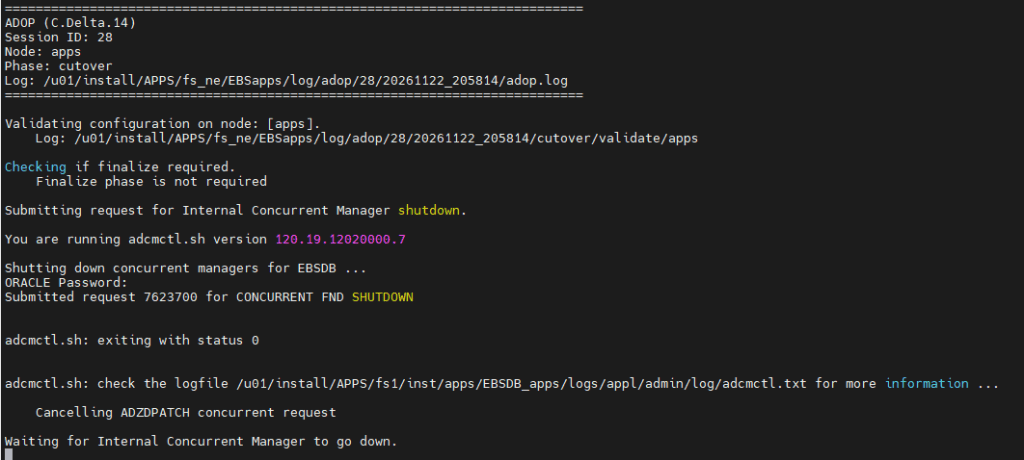
ICM shutdown submitted, ADZDPATCH cancelled, waiting for ICM
adopmon then showed three yellow warnings in a row:
[CUTOVER 4:3] There are still 3 failed jobs in CUTOVER phase[CUTOVER 4:2] There are still 2 failed jobs in CUTOVER phase[CUTOVER 4:4] There are still 1 failed jobs in CUTOVER phaseReset jobs from R (running) to N (not executed) for phase CUTOVER
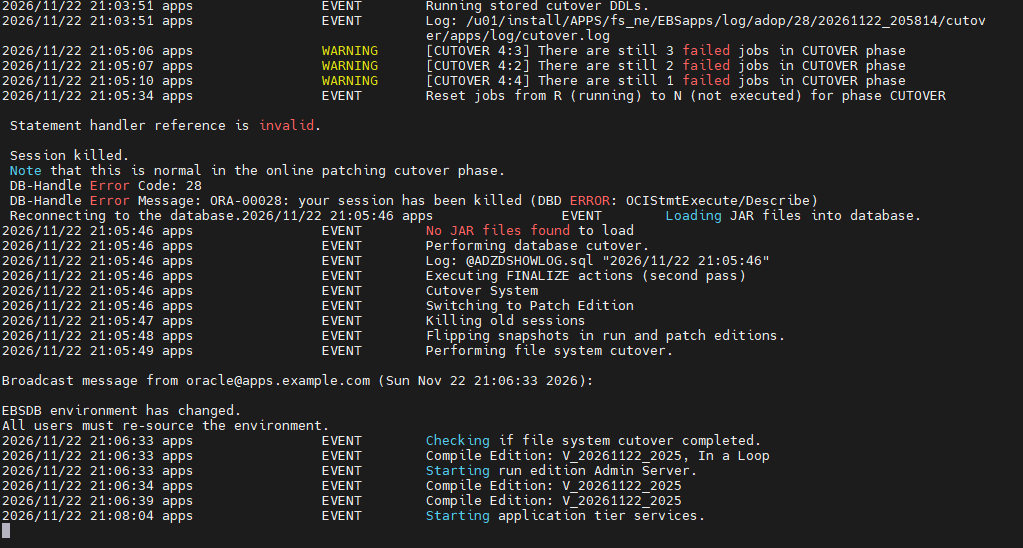
Cutover job warnings, followed by the database cutover
These appeared while cutover was running its stored DDLs. Cutover did not stop. It went on to the database cutover and finished with exit status 0. I didn’t dig into which jobs these were, so I am only recording that they appeared and did not block the phase.
Although the cutover phase completed successfully, the failed-job messages should not be ignored. In a production environment, review the cutover logs and the details of those jobs before declaring the patching cycle clean.
The output also includes an ORA-00028 (your session has been killed). In this cutover run it was expected: adop itself reported that this is normal in the cutover phase, where it kills sessions on the old edition, including its own connection, and reconnects. That does not mean every ORA-00028 in EBS is harmless.
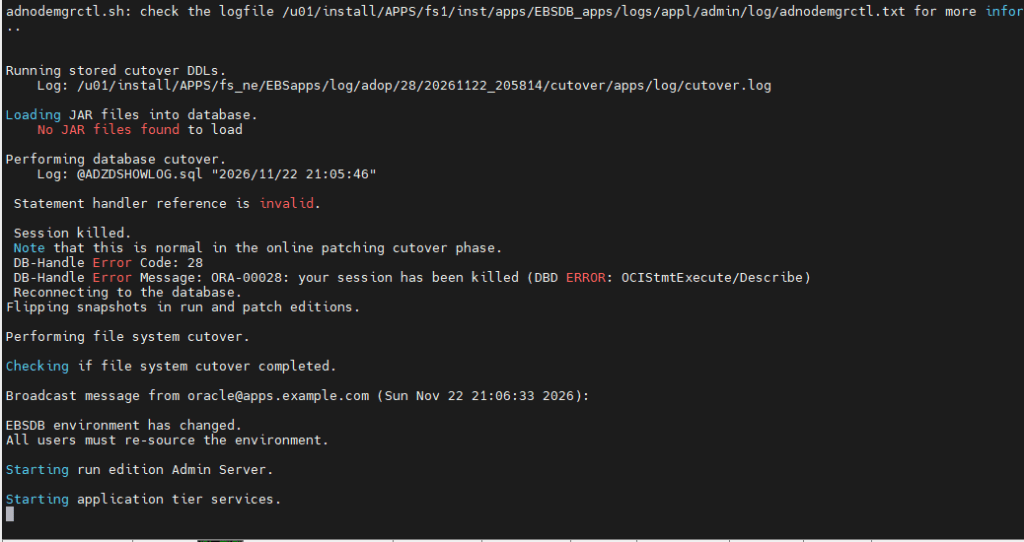
ORA-00028 noted as normal; snapshots flipped; file system cutover; services starting
Then came the database cutover, the snapshot flip, the file system cutover (with a wall broadcast telling everyone to re-source the environment), the AdminServer and application tier start from the new run file system, and the post-cutover reports.
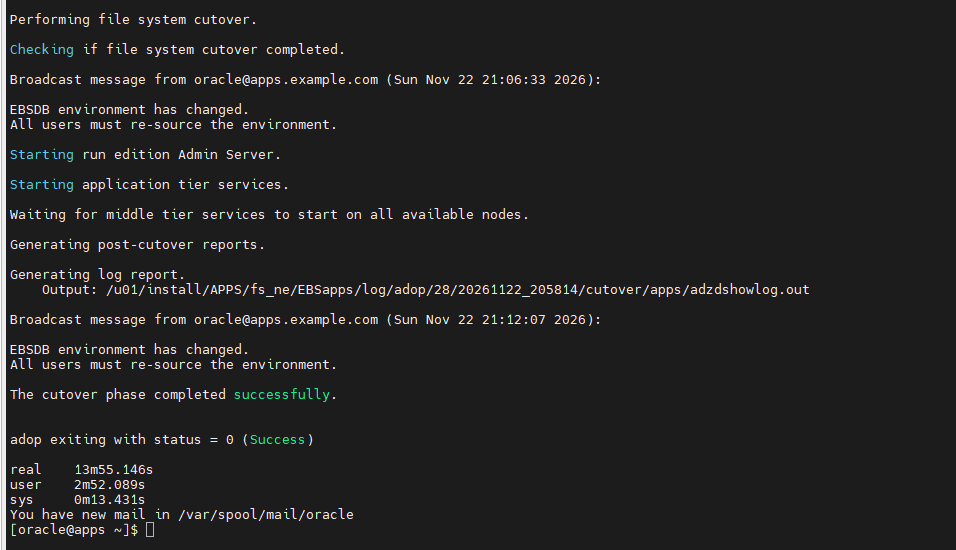
Cutover completed successfully in 13m55s
Step 6: Validate on the new run file system
Any shell sourced before cutover still points to the old run file system, so re-source first:
. /u01/install/APPS/EBSapps.env runecho $RUN_BASEss -ltn | grep -E ':8000|:7001'adop -status
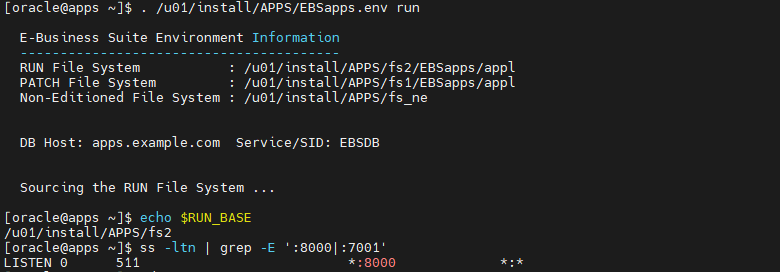
Run file system is now fs2; port 8000 up, but nothing on 7001
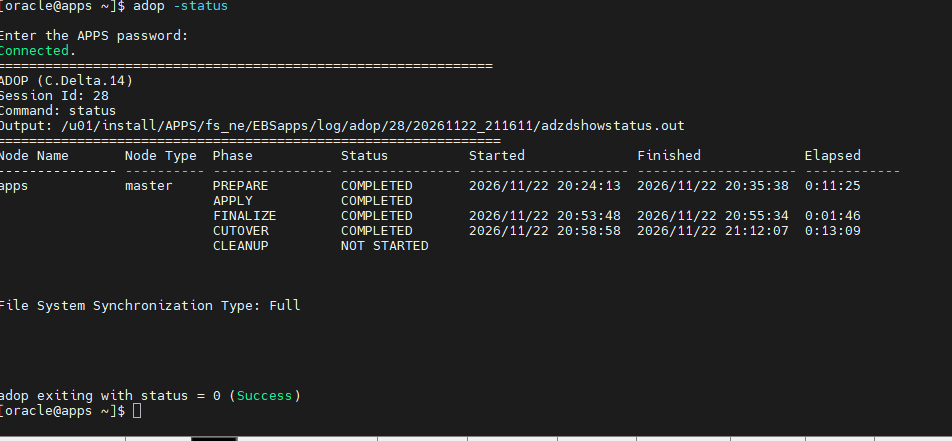
Prepare, finalize and cutover completed; cleanup not started
RUN_BASE now pointed to fs2 and port 8000 was up, but no process was listening on port 7001. The AdminServer was running fine. It had simply moved:
grep -E 's_wls_adminport|s_webport' $CONTEXT_FILEss -ltnp 2>/dev/null | grep -E ':70[0-9]{2}|:72[0-9]{2}|:74[0-9]{2}'$ADMIN_SCRIPTS_HOME/adadminsrvctl.sh status
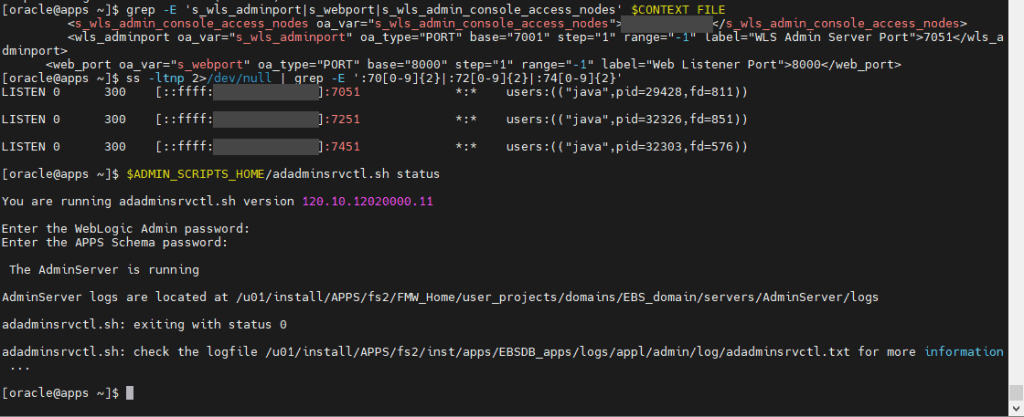
fs2 uses its own port pool: AdminServer 7051, oacore 7251, forms 7451
| Component | fs1 | fs2 |
|---|---|---|
| AdminServer | 7001 | 7051 |
| oacore_server1 | 7201 | 7251 |
| forms_server1 | 7401 | 7451 |
| OHS web port | 8000 | 8000 |
Each file system has its own WebLogic port pool, while the external web entry port stays at 8000. The application URL doesn’t change after cutover, but users can still see a brief planned interruption while the application services are stopped and restarted. The WebLogic console port, on the other hand, moves with the run file system. In my lab firewalld only allowed 7001, so I opened 7051 as well (as root):
firewall-cmd --permanent --add-port=7051/tcpfirewall-cmd --reloadfirewall-cmd --list-ports
Opening the port like this is fine for a home lab. On a production environment, WebLogic Administration Console access should be restricted to trusted administrator IP addresses or management networks rather than exposing the administration port broadly.
With both ports open, the console works whichever file system is the run file system. The console access setting I had added to the fs2 context file while building the lab was already in place, so no AutoConfig was needed for that.
The checks above confirmed the new run file system and the expected middleware ports. In a production environment, I would additionally validate application login, concurrent manager availability, Workflow processing and critical business transactions before handing the system back to users.
Step 7: CLEANUP
time adop phase=cleanupadop -status
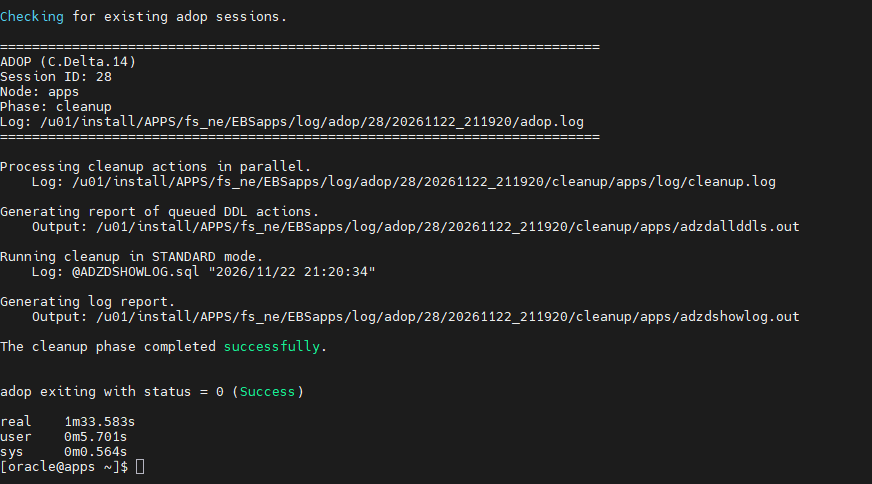
Cleanup completed in standard mode in 1m33s
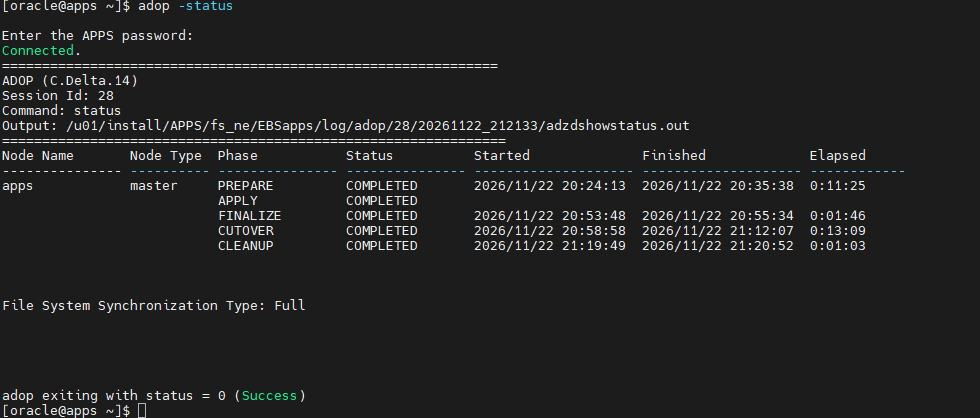
Session 28: all phases completed
Step 8: fs_clone (optional)
An additional fs_clone is not normally required immediately after cleanup. ADOP handles file system synchronization as part of the next prepare phase when required. I ran fs_clone separately in this lab to explicitly synchronize the patch file system with the new run file system and set a clean baseline for my next exercise:
time adop phase=fs_clone
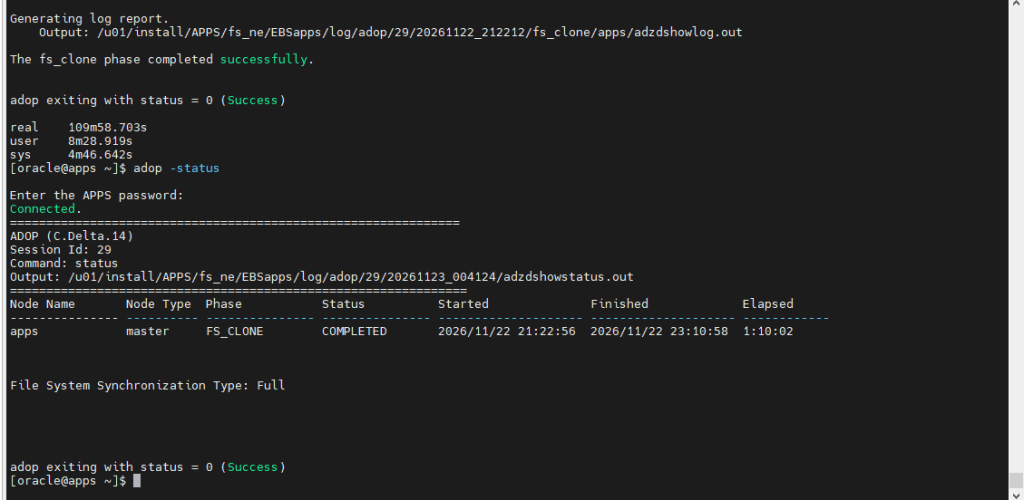
fs_clone (session 29) completed successfully
FS_CLONE was the longest operation: just under two hours. That figure reflects my VirtualBox VM and desktop storage, not a typical duration. On other hardware it can be much shorter or longer.
Timings
| Phase | Session | Result | Wall-clock time |
|---|---|---|---|
| PREPARE | 28 | Completed | 13m41s |
| FINALIZE | 28 | Completed | 2m19s |
| CUTOVER | 28 | Completed | 13m55s |
| CLEANUP | 28 | Completed | 1m33s |
| FS_CLONE | 29 | Completed | about 1h50m (lab) |
ما شاء الله, all executed ADOP phases completed successfully with exit status 0. I shut the VM down cleanly and took a new snapshot as the next baseline.
Lessons learned
- An empty ADOP cycle is a useful way to exercise the Oracle EBS 12.2 online patching workflow without applying an actual application patch. It provides an opportunity to validate edition creation, file system synchronization, AutoConfig, cutover and cleanup in a controlled environment.
- Run
adopmonin a second session. Timestamps for each step make it easy to see where time goes and where a phase is waiting. - Check running and scheduled concurrent requests before prepare and before cutover. ADZDPATCH waits for incompatible requests, and cutover waits for the managers to stop.
- After cutover, re-source the environment in every open session. Old shells still point to the previous run file system.
- Know your port pools. The WebLogic console port changes with the run file system (7001 on fs1, 7051 on fs2 here). Open both in the firewall, and keep console access settings in both context files.
- Read warnings in context. The ORA-00028 observed in this cutover run was expected. The MTCC warning and the cutover job warnings didn’t stop anything here, but on a client system I would check them before signing off.
- Take a snapshot before and after. In a lab, that is the real rollback plan.
Conclusion
This exercise let me run the complete Oracle E-Business Suite 12.2 online patching lifecycle without applying an actual patch. From preparing the patch edition through cutover, cleanup and fs_clone, I could watch how the dual file system architecture behaves during an ADOP cycle.
One important takeaway: a successful adop exit status does not replace proper validation. Warnings, concurrent requests, application services, WebLogic ports and post-cutover checks all deserve attention.
Beyond the technical execution, this exercise reinforced an important production DBA practice: successful patching is not just about running adop commands. It also needs proper change approvals, maintenance-window coordination, backup readiness, stakeholder communication and post-cutover validation.
This lab run is now my baseline for future EBS patching exercises. More Oracle DBA home lab exercises are coming soon, In Shaa ALLAH.
References
- Oracle E-Business Suite Maintenance Guide 12.2: Patching Procedures
- Oracle E-Business Suite Maintenance Guide 12.2: The adop Utility
- Oracle E-Business Suite Concepts 12.2: Online Patching
- Oracle EBS Technology blog: Online Patching FAQ (MOS Doc ID 1583902.1)
- My earlier post: building the EBS 12.2.12 Vision lab on VirtualBox
If you have run empty cycles in your own labs, or seen the MTCC or cutover job warnings on real systems, I’d like to hear about it in the comments.
Disclaimer: This was done in a personal home lab for learning purposes. Hostnames are the appliance defaults, IP addresses are masked, and no passwords are shown.
